Deep Tech: Trail Camera Firmware Hacking 6 — 3rd Party Reverse Engineering Tools
The key to any significant software project is to use tools to reduce the amount of tedious, and error-prone work that must be done by a human. In this post I give a description of the key 3rd party tools I’ve used to reverse engineer Browning trail cameras. These tools then become part of a “flow” used to address a sequence of operations necessary to program, and then release firmware images. This post is part of a multi-part series. See Deep Tech: Hacking Trail Camera Firmware 1 — Overview for context and pointer to other posts in this series.
Ghidra
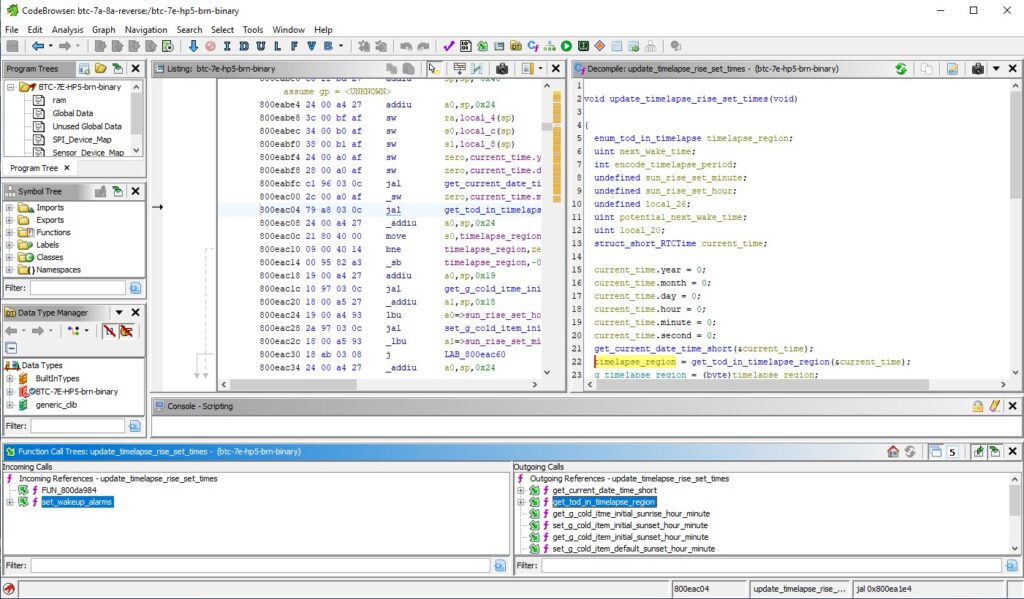
In many ways, an open source software reverse engineering tool called “Ghidra” enables this whole process. With some considerable guidance, this powerful tool converts the opaque low level embedded firmware binary into a structured, high level language representation. This tool merits it’s own post, with some examples, which I will cover later in this series.
Ghidra starts with a binary and an instruction set architecture (ISA), and then uses a number of automatic analyzers to figure out the code and data components of the input. In analyzing the code segments, Ghidra disassembles the binary into a detailed assembly code listing. Ghidra uses this representation to decompile the assembly code into C-code. The screen shot below shows an example of the C-code Ghidra generates after some “hand-annotation.” is not very edifying at first.
Ghidra can figure out the structure of the C-code, including control flow, variable declarations, and the static call stack, but it has no idea what the functions do, and therefore how they should be named; or how variables are used, and therefore how they should be named. But it does allow the user to rename functions and variables, set return value types, and correctly type local and global variables (including defining customer structures).
Google Colab
Google Colab offers a free, “worksheet”-based web-interface to its cloud computer services. This environment has native support for a Python interpreter, as well as access to server command line and tools. It is also possible to share files between Google Colab and a local PC with GoogleDrive, as well as GitHub.
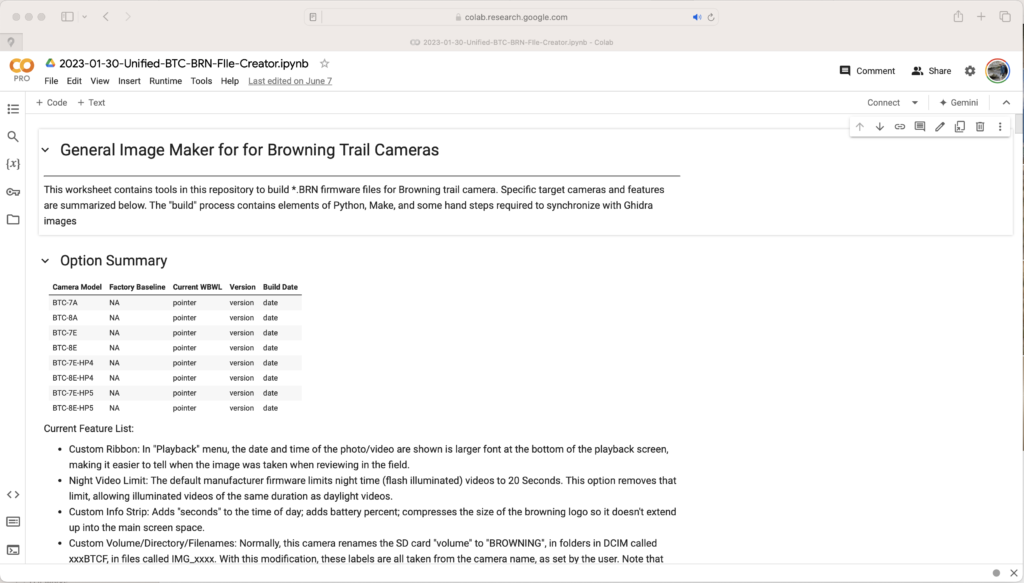
This allows me to use the speed, and software stack of a modern server, without having to buy, or maintain one. Even better, the code base and supporting files can be accessed from any device with a web-browser and a keyboard.
I developed a lot of my software in Python. I was also able to run the GCC cross compiler. The Worksheet format allows me to document a flow in the same place it is executed.
GCC Cross-Compiler
One of my goals was to be able write new functions in a high level language, like C. The Gnu CC Cross-compiler is the industry standard for converting C and C++ code into object and binary level files. It also helps integrate these files into an existing binary firmware image.
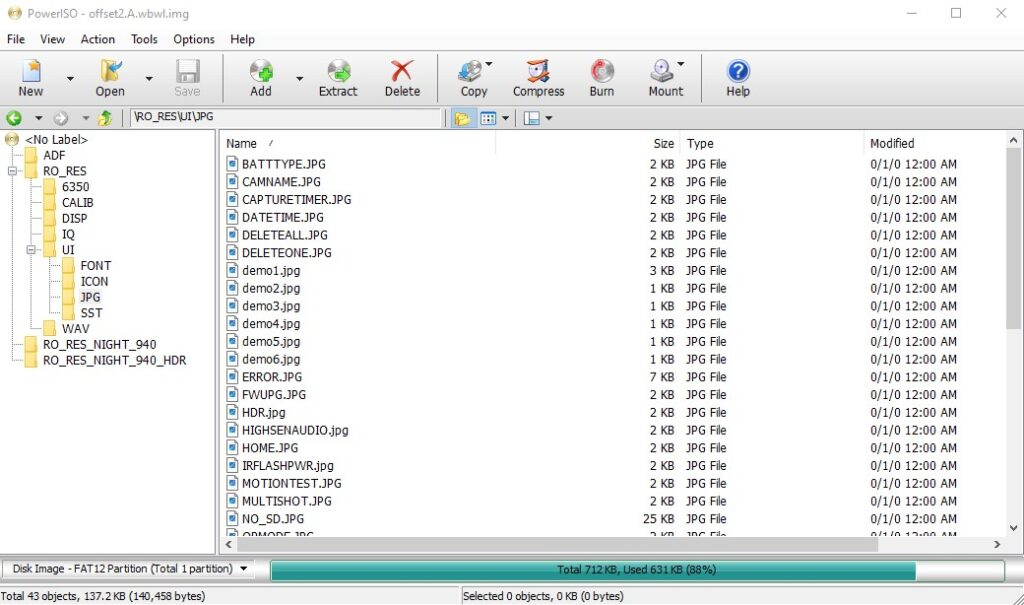
Power ISO
The camara firmware includes several FAT file system images. These provide access to run-time-loaded libraries, graphics files, font files, and files used to store parameters. I use Power ISO on my PC to parse these files, and to create new versions with different files necessary for new functions. I notice that my virus protection software has lately prevented me from upgrading PowerISO to a newer version due to potential security risks. It may be that you want to find a different tool to modify FAT file systems.
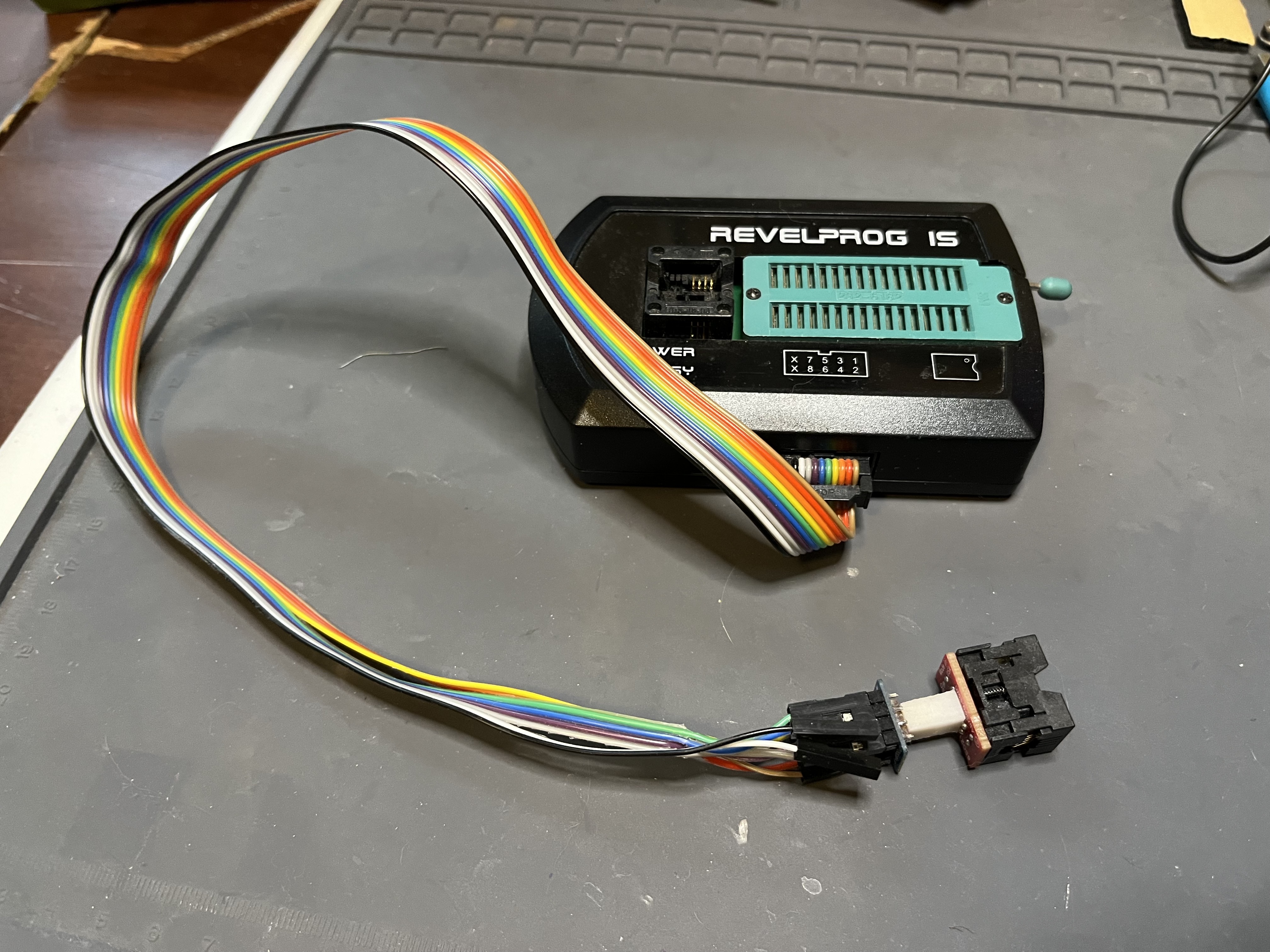
RevelProg IS EEPROM Programmer
A USB-based tool for reading and writing EEPROMs. The “programming head” has both a DIP ZIFF socket and a SOIC ZIFF socket, as shown in the photo below. Unfortunately, the SOIC ZIFF socket is too narrow for the EEPROM used in Browning Trail cameras. I used an auxiliary ribbon connector (provided with programmer), and a pluggable ZIFF socket for the wider SOIC. The pluggable ZIFF socket has an opposing SMD connector which I soldered to the PCB of my development camera(s) after carefully removing the existing EEPROM.
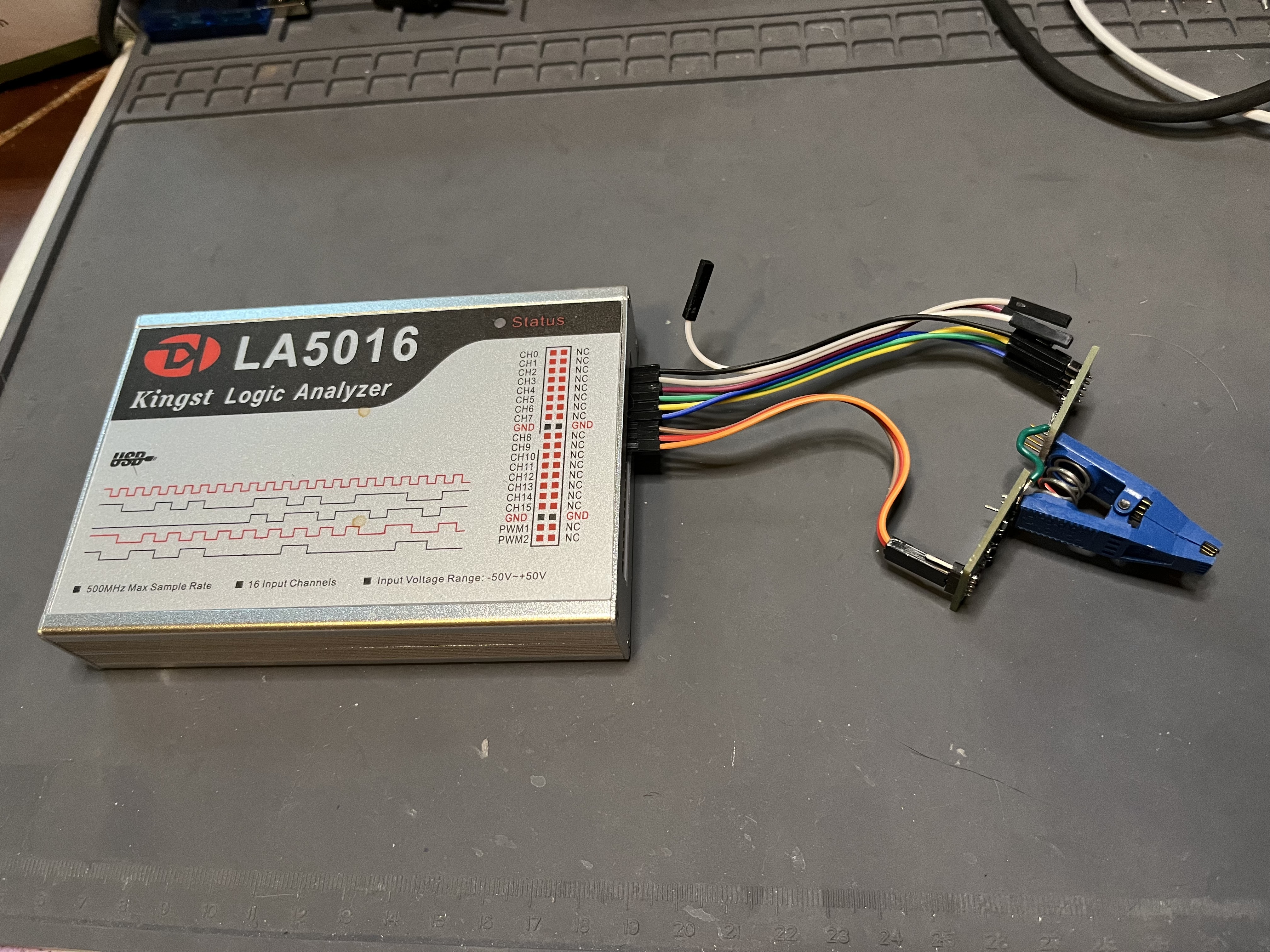
Kingst L50116 USB Logic Analyzer
I have found that the factory EEPROM contains some data which is not included in the firmware image. A low-cost USB logic analyzer, and a custom designed active SOIC clip adapter to capture the time sequence of signals on the 6-active pins of the EEPROM allowed me to capture this data from a working camera. I use an internal tool to convert the logic analyzer trace to a binary image that I can load into a new firmware image.
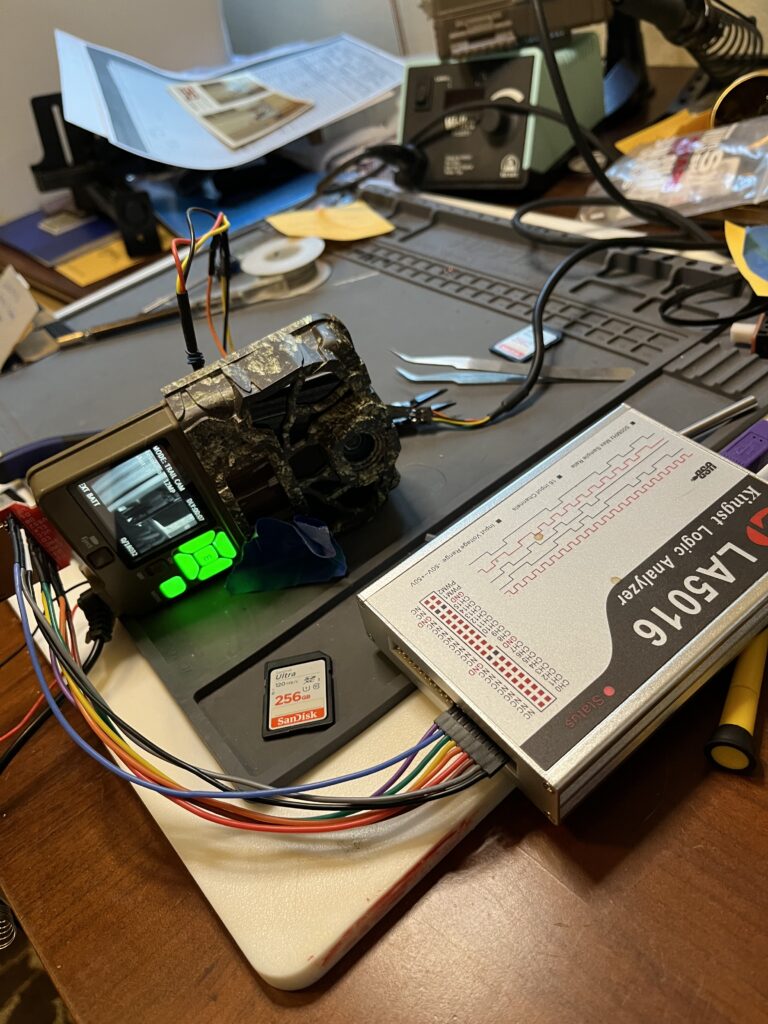
In addition, for debugging an SD card corruption bug, I found an SD card extender (SparkFun), in conjunction with the logic analyzer allowed me to capture traces of SD card accesses.
PuTTY
I use Putty as a basic terminal emulator for this trail camera hacking project. This gives me interactive access to the debug serial port on the camera via a 3.3V USB to Serial UART adapter.
3.3V USB to Serial Adapter
An integrated protocol adapter for converting USB to a raw serial port. There are many sources for this part online. It is very important that the serial port support 3.3V signaling.
Coming Attractions
In my next post in this series, I will cover some of the hardware and software tools I developed myself.
Resources
GCC Cross Compiler/Linker/Loader: The classic toolset for converting high level code to architecuture-specific object and binary code.
Ghidra: Powerful software reverse engineering tool originally leveled by the US National Security Agency and now made open source and widely available.
Google Colab: a cloud based execution environment with Python Runtime support; command line access; and integration with GoogleDrive.
Kingst L50116 USB Logic Analyzer: 16, 500MHz maximum sample rate USB logic analyzer. This affordable logic analyzer lacks shielded high speed test probes and complex trigger sequences, but it works fine for observing the IO of the trail camera EEPROM at low speeds.
PowerISO: A tool for operating on file system images, including the FAT12 file system images used in Browning Trail Cameras. Allows both inspection of files from the file system image, as well as insertion and deletion of files on that system.
PuTTY: Open source terminal emulator. PutTTY does all sorts of things, but I use it merely as a vanilla terminal to front the serial port connected to the development camera.
RevelProg IS USB EEPROM Programmer: Affordably priced USB device for reading and writing EEPROM devices. I used these to recreate working EEPROM images when I wedged the development camera.
3.3V Serial Port to USB Cable: Used to drive the debug serial port on the development camera. There are multiple vendors for this generic part, e.g. this one from Tech
Hi Bob
You’re giving me history-based nightmares from programming labs in my Electrical Engineering degree 🙂 mind, we had none of your fancy tools. Lucky to have a dumb terminal with 4 colour display… mostly it was monochrome though. Nobody had heard of an EEPROM, it was all UV-erasable EPROMs (that cost a fortune per byte – $K or 8K byte was normal, 16K the sign of a very rich man and reports of a 64K or even (gasp) 128K were treated with derision)
Man I sound like something from a Monty Python sketch lol
I know, right? The technology train waits for no engineer. Having retired from a job at the cutting edge of computer design, I watch the latest AI tech recede over my horizon like a ship disappearing in the distance. Bon voyage, I say!
“Have you got anything without spam?”
“Well, spam, egg, sausage, and spam – that’s not got much spam in it.” – MPFC
-bob
Wow Bob, this post puts into perspective what a trail camera hack really entails.
Decidedly not for amateurs!
Your software has enabled me to capture wildlife behavior as never before.
Thank you for your expertise and generosity.
Thanks, Tom. So glad these have helped you get good stuff! To be honest, if I had known how much work getting these hacks in would ultimately take, I might never have started. Ignorance and/or unbridled optimism in the face of prior experience sometimes does produce good results!
Hi Bob,
I wanted to start by expressing my appreciation for the latest firmware you’ve developed for the Browning Spec Ops Elite HP5 — it’s incredibly useful, and I’m grateful for all the work you’ve put into it.
I’m reaching out with a couple of feature suggestions that I believe could enhance the user experience.
Date Format Customization: While I’m aware of the YYYYMMDD date format currently available, I would greatly appreciate the option for a YYYY/MM/DD format with separators. This adjustment would provide improved clarity for organizing and referencing files.
Daily File Creation for TIMELAPSE+: I’m actively using the TIMELAPSE+ feature with the ALL DAY/ALL NIGHT setting, and I’ve noticed that recording continues until the file reaches 2GB before creating a new one. It may be more user-friendly to automatically create a new file at the start of each day (e.g., 00:00). This would make it easier to locate and manage recordings corresponding to individual dates.
I hope these suggestions align with your vision for future updates, and I’d love to hear your thoughts on whether they might be feasible. Thank you again for all your hard work on this firmware — it truly makes a difference for users like myself.
Looking forward to hearing from you!
Best regards,
Philip
I’m glad my firmware is helping! Adding the date variation should be straightforward. I’m working on a major release right now, and I’ll see if it can squeeze this in. The “day boundary” on TLS file makes a lot of sense, but is more complicated. For example, the number of captures per day will depend on the timelapse frequency. In cases of low frequency, it would seem to be better to have the boundary be once every couple of days, or once a week, or even once a month. Would appreciate your thoughts on what would make sense for general frequency/period setting.
Hi Bob –
If the timelapse period is set to “ALL DAY,” the system will currently create one file per calendar day. I propose maintaining consistency by applying the same behavior when “ALL DAY/NIGHT” is selected—to create one file per calendar day, with the boundary reset at exactly 00:00:00 midnight. This structure would align with the default firmware operation and enhance the usability of the “ALL DAY/NIGHT” option.
My use case involves capturing the night sky, as well as early mornings and evenings, without the IR filter. However, when files are blended together until the system reaches a 2GB reset, finding the content for a specific date can become cumbersome. Breaking files at calendar day boundaries simplifies this process.
For users who want to combine files spanning multiple days, this can easily be accomplished using any standard movie file combiner. I hope this suggestion improves functionality and consistency while accommodating diverse user needs.
Best, Philip
Thanks for this thoughtful spec! It makes a lot of sense. I will let you know when I have it working.
Awesome! Looking forward to it.
I just released a major version “*_250321R” of my firmware for Browning trail cameras. See:
https://github.com/robertzak133/unified-btc-reverse
This new release contains both new features you requested:
• A new “YYYY/MM/DD” format for date. See the last setting the the “DATE FORMAT” menu
• New .TLS at midnight when operating the camera in “ALL DAY/NIGHT” setting for “TIMELAPSE PERIOD”
I hope these work well for you.
Hello Bob. Thank you for your detailed posts about trail cams and for working to improve the firmware for Browning cameras. If you continue your work on Browning firmware, I have a feature suggestion intended to avoid startling animals with the IR filter click.
At dusk the filter would proactively move away from the lens. At dawn the filter would move in front of the lens. Alternatively, the lens could automatically move at times specified by the user. And if the camera thinks the filter is in the wrong position during any trigger, allow the camera to move the filter just as it does under factory settings. The idea is to just proactively put the filter in the probable correct position to reduce filter clicks when an animal is there.
Great minds think alike 🙂 This feature has been sitting in my “wish list” spreadsheet since 2022. At the time, I was a little intimidated by the prospect of reversing the time-based wakeup mechanism in the firmware, but I eventually had to figure this out to get the new timelapse features working. Certainly, Janet and I suspect the “click” in several cases of scared animals. I’m up to my elbows in other work at the moment, but it’s looking like this will be a long winter here in NW Montana, so maybe I’ll find enough time to catch up on the reversing project. Really appreciate the suggestion!
It looks like Browning may be releasing new Recon and Spec Ops models soon. Wildlife Monitoring Solutions lists a Recon Force ELITE HP5 ULTRA BTC-7E-HP5U and a Spec Ops Elite HP5 ULTRA BTC-8E-HP5U. TrailCamPro has a coming soon listing for the Spec Ops Elite HP5 Ultra. They appear to have higher res sensors than the existing HP5s.
That would be a logical thing for them to do. They’ve been using variants of the relatively resolution (2mp) Sony sensor since the advantage series. The internal architecture allows them to easily swap in a new camera board without changing the main motherboard. They may need a beefier soc to handle the higher pixel rate. I’ll put this on my list of cameras review. Thanks for the heads up