
Browning Elitę-HP5-Ultra Trail Camera Review and Teardown
Browning recently released the latest model in SpecOps/ReconForce line of cameras, the Elite HP5-Ultra. Readers of this blog will know that we have a lot of experience with the SpecOps/ReconForce family going back to the Advantage series cameras. We have thousands of camera hours on these cameras. We bought 5 of the new SpecOps Elite HP5-Ultras when they first came out.
I won’t mince words — the Browning Elite HP5 Ultra is a disappointment — particularly for brightly lit landscape scenes where it tends to wash out the background much more than earlier models. This is not a hardware problem — my teardown shows that the HP5-Ultra features a more modern Sony Starvis2 sensor, and a higher performing SystemOnChip. It should be better than earlier models in almost every respect. However, shortcomings in the firmware prevent this camera from living up to its potential. Indeed, the original factory firmware for these models introduced so many visual artifacts, that Browning was forced to issue an “emergency” firmware update through their distribution channels. This new firmware fixes some things, but the high light washout persists. I am hoping that Browning will spend more time figuring out what went wrong, and issue a comprehensive firmware update for this camera. In which case, I will eagerly update this review. But for now, here’s what I’ve found.

Teardown
The HP5-Ultra shares the same physical packagaing as earlier the earlier HP5 models. I took apart a new HP5 Ultra, and found that the LED flash, the boot controller and PIR mechanisms, the LCD display, and keyboard are all carried over from the earlier HP5 models.
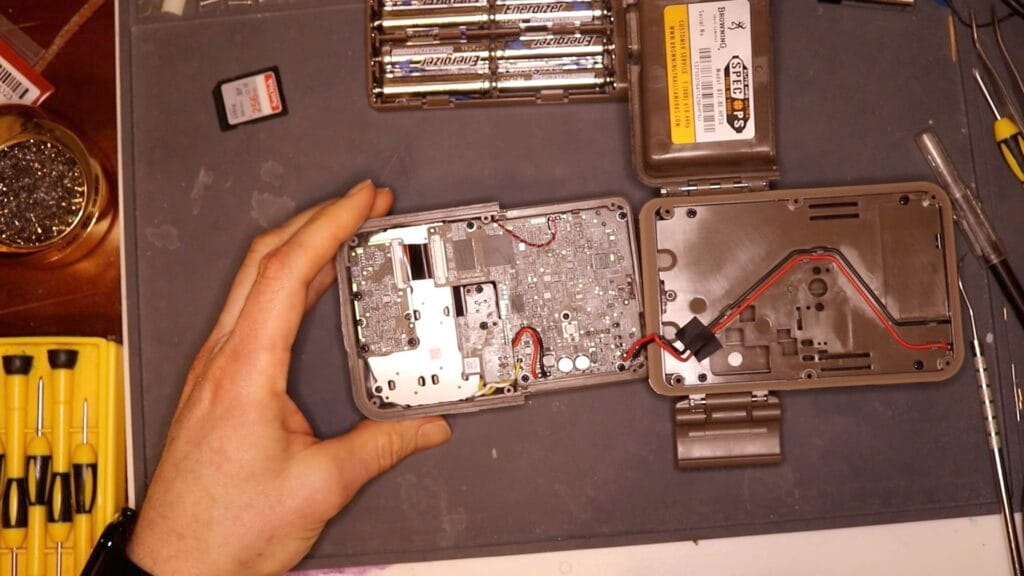
I did find two substantial new additions: new SOC (System On Chip) and a new image sensor.
Image Sensor
The specs for this new camera are very similar the earlier HP5 model. The key difference is an advertised doubling of the sensor resolution. Earlier models of this camera, going back to the Advantage, have a sensor resolution of 2.1 MPixels (1920 x 1080). The new HP5-Ultra improves on this resolution, and features a QHD (2560 x 1440) video resolution at 60 FPS in “ULTRA” video quality mode. The advertised photo “resolution” of 48 MPixels is the result of the firmware and hardware “interpolating” pixels based on the data from the raw sensor, so is a less reliable indicator.
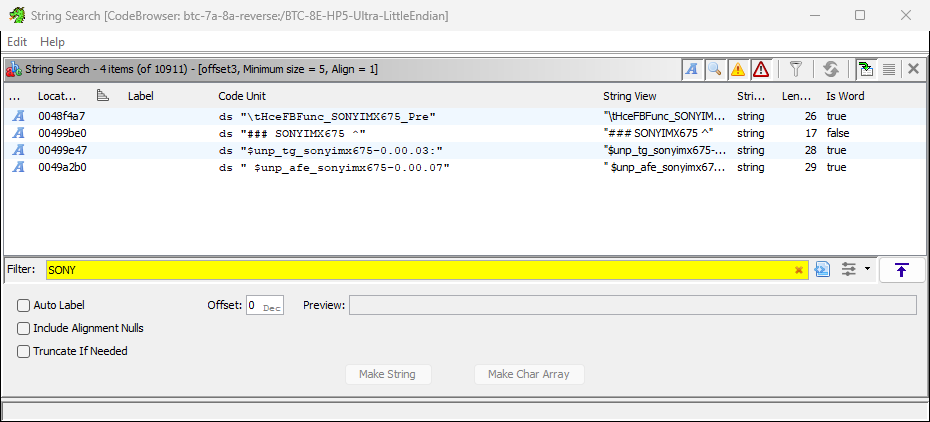
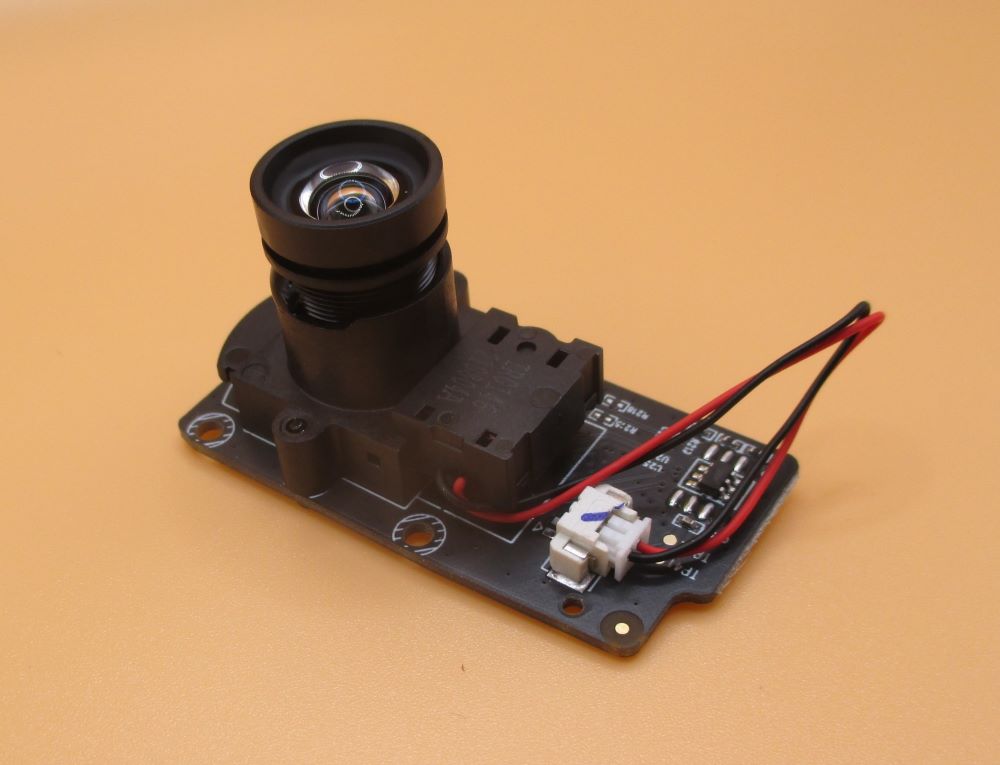
The Elite Series system design introduced an internal architecture where the camera sensor is on a separate PCB from the main compute board. The new HP5-Ultra takes advantage of this architecture by offering a new sensor board. The sensor board includes the image sensor itself, the IR filter and motor, and the camera lens. It’s very difficult to determine the make and model of the sensor by visual inspection. Fortunately, I was able to analyze the latest firmware drop for this camera and figure out that the HP5 Ultra firmware is using a SONYIMX675 image sensor. This is a legit 2608 x 1960, 5.1 MP Starvis2 sensor. This is an improved technology sensor vs. the ExmorR tech in the IMX327 sensor used in the earlier , HP5.
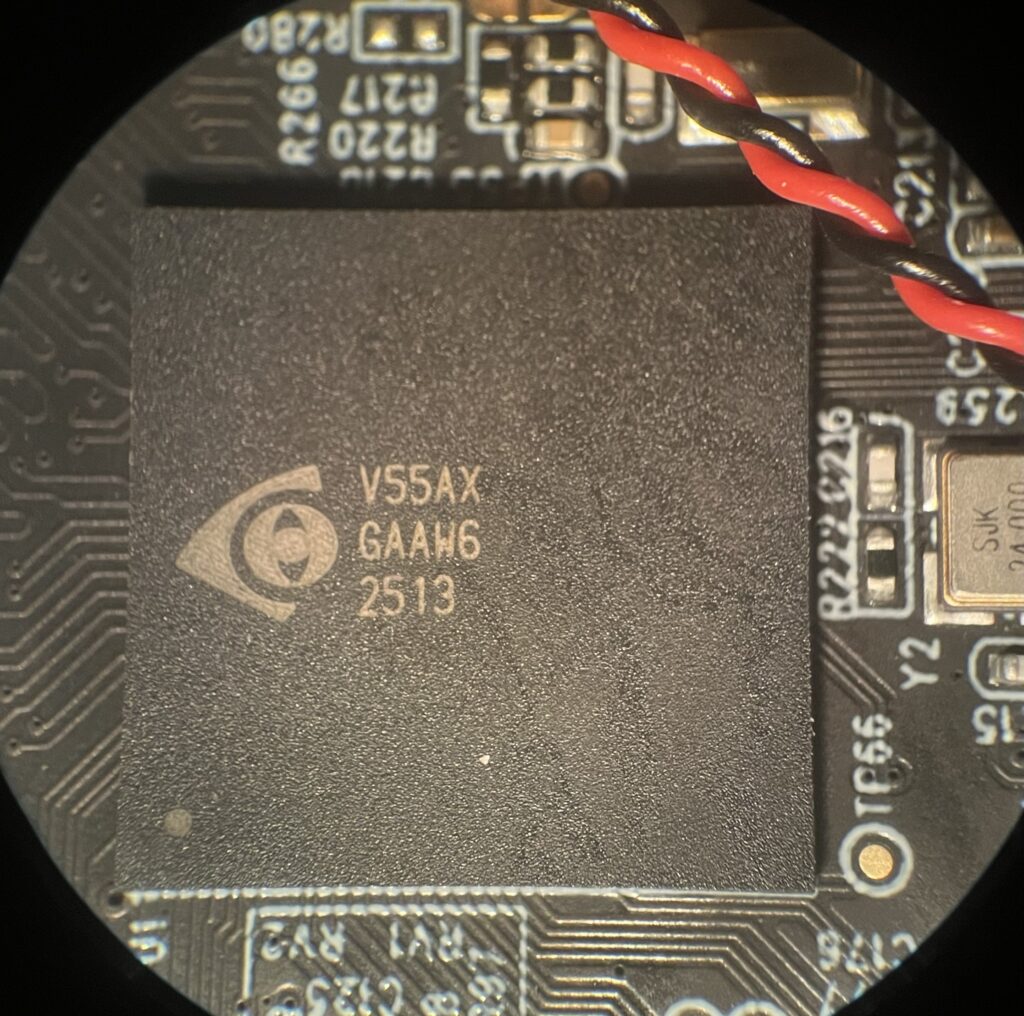
iCatchTek V55AX System on Chip
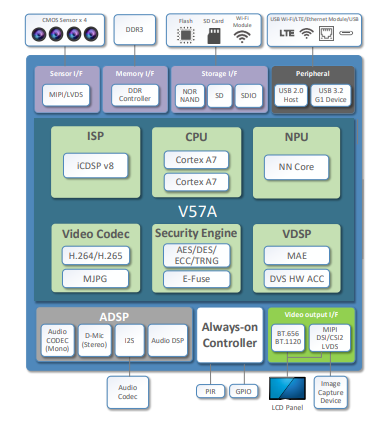
A visual inspection of the HP5 Ultra main circuit board shows that the iCatchTek V38 SOC used in earlier cameras has been replaced with the newer, faster iCatchTek V55AX. The closest thing I can find online for documentation on this device is for the V57A, and it is quite sparse, but is revealing. The V57 features two high performance ARM CPUs (vs. a single MIPS core in the V38), and several new hardware pipelines for image processing. Critically, the V5x family supports UQHD resolution at 30FPS, and QHD resolution at 60 FPS. The latter is the new “ULTRA” video format for the HP5 Ultra.
The V57A includes several new hardware features which I don’t believe are used by the current firmware. These include:
- An “AI-based denoise engine”: This could, in principle, be used to further improve low light performance, using AI models to correct grainy photos or videos on the fly, as is done in modern smart phone cameras. I don’t think this feature is used, or perhaps it is, in which case it needs some major tuning.
- An NPU for AI-image recognition support: This feature is used in security systems to dynamically identify people or objects in a field of view. It hasn’t been used in trail cameras, I believe because passive benefits are outweighed by the energy cost of executing complex, power hungry models on a limited battery power budget.
- An”always on” controller which supports processing of data from a PIR sensor and an internal RealTimeClock. These could be used in the future to eliminate external components, but I don’t think this optimization has been made yet.
Getting My Hopes Up
Bottom line, the HP5 Ultra ought to be able to match, and even improve, on the HP5 “classic” image quality based on the underlying sensor and image processing hardware.
Image Quality
Early feedback to Browning distributors pointed to serious problems with image quality in the new HP5-Ultra cameras. As a result, Browning introduced a “new” firmware image to address these problems. In this section, we’ll see how they did. I’ll give examples of these below, but issues included pixelation around details in images, and poor exposure control leading the “washed” out areas in images.
I set up tests with three cameras: a SpecOPs Elite HP5 (classic), a SpecOps Elite HP5-Ultra with “original” (factory original firmware, “BTC8EHP5U_P1124OF”), and HP5-Ultra with “new” (updated firmware as of 2/6/2026, “BTC8EHP5U_QO2020FT”). The three cameras are placed as close as possible to each other, pointing in the same direction, and triggered at the same time. Date and time stamp are (mostly correct), showing that the lighting conditions are the same for each. I took landscape and close up videos under bright daylight, and low light dusk conditions.
See the video below for examples to back up the text in the following sections.
Video
The HP5 Classic does much better in bright light landscape scenarios than the HP5-Ultra, with old or new firmware. The HP5 Classic effectively darkens the foreground to prevent the background from washing out. It’s not perfect, but it’s as good, and sometime much better, in all the lighting scenarios than the new HP5-Ultra with the new firmware.
The new HP5 Ultra firmware fixes the pixelation problems with the original firmware, but at the cost of washing out the background even more in bright light conditions.
In low light conditions, the old firmware in the HP5 Ultra produced pixelated detail vs the HP5 Classic. The new Hp5-Ultra firmware seems to fix this. With the new firmware, we can appreciate the slightly richer color from the HP5-Ultra vs. the older HP5
Overall, the new firmware for the HP5 Ultra is an improvement for many camera trapping sets, which are likely to operate under low light conditions. There are a couple of tweaks needed to improve the color rendition, but these are small.
However, the HP5 Ultra, even with the new firmware, continues to underperform in bright light conditions. The new HP5 Ultra firmware washes out bright backgrounds even more than the original firmware, and both are much worse than the HP5 Classic.
Nighttime Video a Bright Spot
I did find the nighttime video for the new HP5-Ultra, even with the original firmware, is at least as good, to may eye, as the HP5-classic. This ought to be the case, since the IMX675 Starvis2 sensor is more sensitive to IR than the older ExmorR IMX327 used in the earlier HP5. To my eye, the HP5-Ultra clip on the right captures more slightly more detail of the animal, the ground litter, and even the tree needles.
Still Photos
I found that the image quality of still photos had similar issues to the video.
I did do some comparison tests between the stills taken with HDR “OFF” and “ON”. In principle, “HDR” (or High Dynamic Range) should improve the image quality of photos with bright and dark areas. I found this effect to be small, and that it did not fix what appears to be a fundamental problem with exposure settings.
Other Findings
Image quality is definitely the lede for this review, but I did document a few other changes.
Field of View
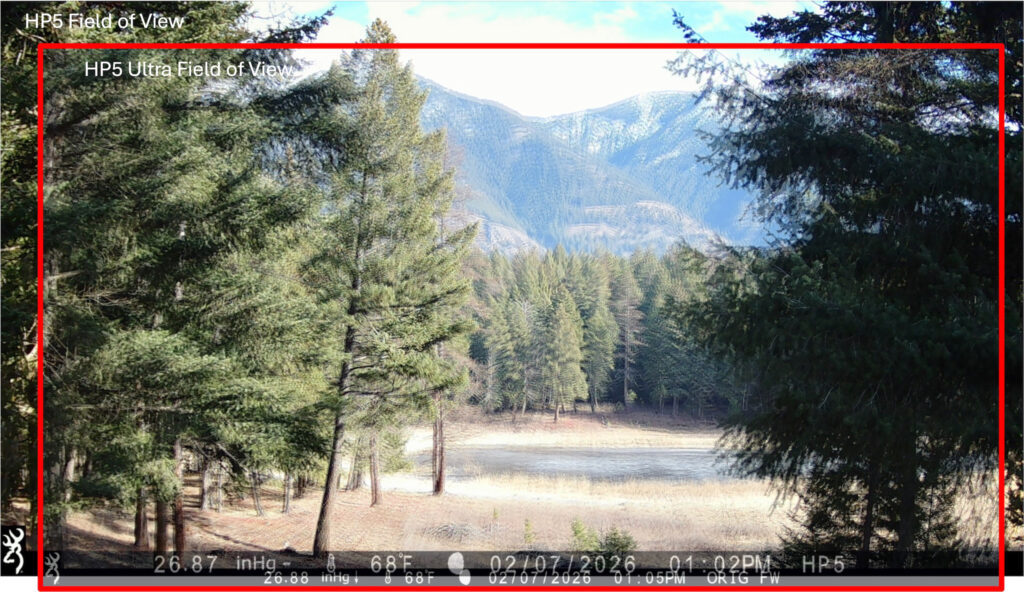
The HP5 Ultra appears to feature the same wide angle lens introduced in the HP5 series (see: DIY: Trail Camera Lens Hacking). We like this lens a lot since it allows us to get a view of more animal in tight sets. The images are not exactly the same — the new HP5 has a slightly narrower field of view. I believe this is because the final image is “cropped” — and only uses 4.1 Pixels of the available 5.1 MPixels on the sensor.
The HP5-Ultra appears to operate in a “cropped mode” in which it only uses the central 2560 x 1440 pixel window within the overall 2608 x 1960 physical sensor size. This results in a slightly smaller field of view than the HP5, despite having essentially the same lens.
Power Consumption
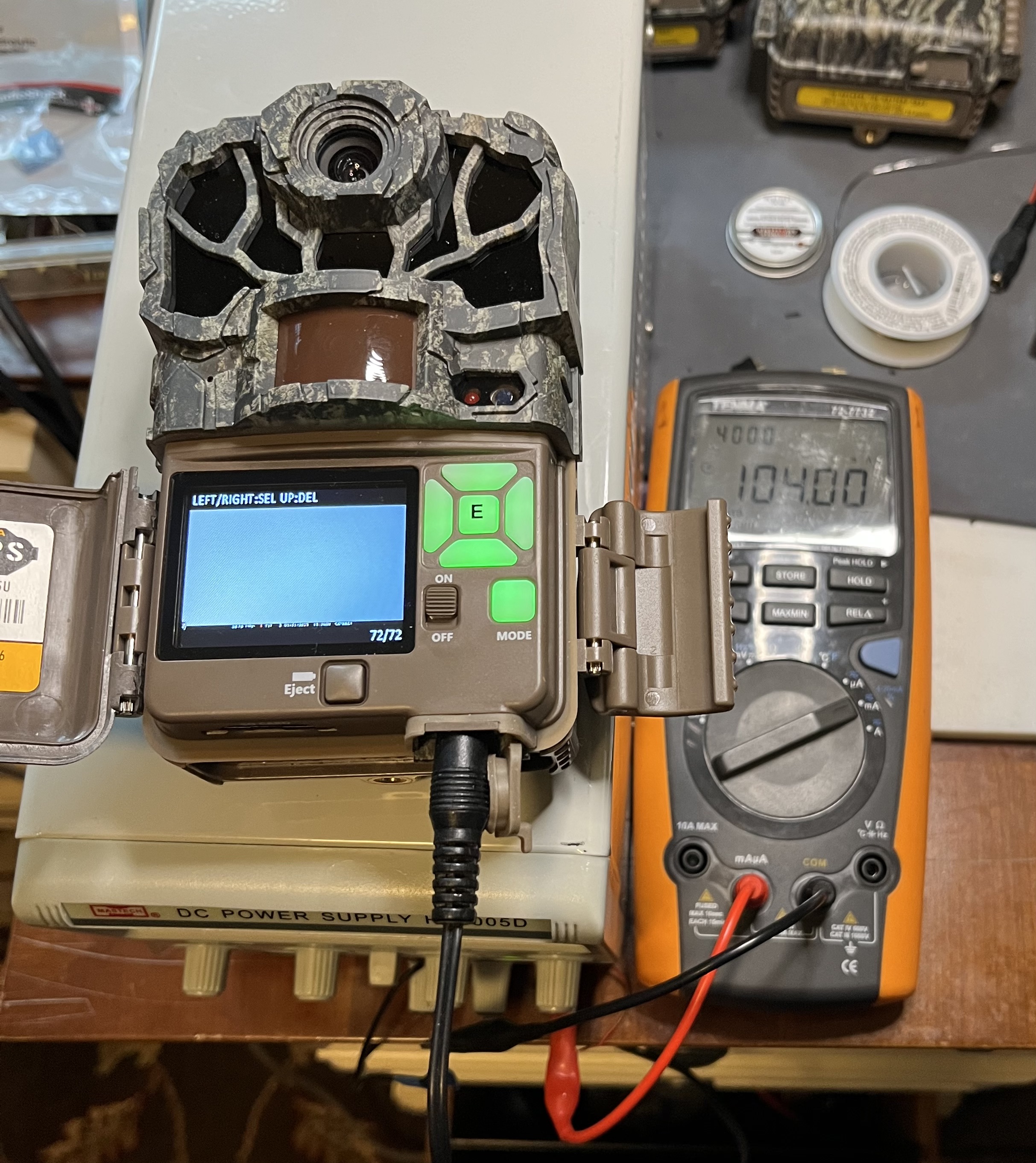
I measured the power consumption of the new HP5 Ultra in the lab and compared it to the earlier HP5 model. I measured four operating points: sleep ; in PLAYBACK mode; taking daylight video; and taking nighttime video with the LED flash. When taking video, I measured power of the HP5 in ULTRA (FHD) quality, and the HP5-Ultra in HIGH (FHD) and ULTRA (QHD) video quality modes. Here’s what I found.
| Operating Point | SpecOps Elite HP5 | SpecOps Elite HP5-Ultra | HP5 Ultra vs. HP5 |
| Sleep | 820 uW | 1000 uW | 25% Greater |
| Playback | 0.66 W | 1.4 W | 208% Greater |
| Daylight Video QHD @ 60 FPS | Not Supported | 2.44 W | — |
| Daylight Video FHD | 1.98 W (60 FPS) | 1.56 W (30 FPS) | 35% Less |
| Night Video QHD @60 FPS | Not Supported | 4.36 W | — |
| Nigh Video FHS @60 FPS | 3.96 W | 4.48 W | 13% Greater |
Sleep Mode Power
The HP5-Ultra consumes 25% more power in sleep mode. This likely due to a new “always on” portion of the new iCatchTek V55 SOC. The new SoC includes built-in-support for a PIR device, which the designers could use this to replace a small, ultra-low-power microcontroller that was needed on previous models to monitor the PIR sensor while the SOC was off. This would substantially reduce the standby power, but for now, the extra “always on” circuit in the SoC is just adding to the power consumed while the camera is asleep. In principle, the increased sleep power will reduce the amount of time the camera can be left in the field, and/or to reduce the battery capacity available to take videos or photos. In practice, it might reduce the maximum field time on a set of Lithium batteries from 5.1 years to 4.1 years. Alternately, over the period of 6 months, it might reduce the amount of video that can be taken by 30 minutes.
Daylight Video Power
The HP5-Ultra uses 35% less power while taking daylight video in FHD resolution at 30 FPS (HIGH in the HP5-Ultra settings) , vs. the HP5 in FHD resolution at 60 FPS (ULTRA in the HP5 settings). The HP5-Ultra at its maximum QHD resolution and 60 FPS uses 2.44 W, which is about 23% higher power than the maximum FHD resolution of the HP5.
It is unfortunate that the “HIGH” setting on the HP5-Ultra does not match the “Ultra” setting on the earlier HP5. The “HIGH” setting on the HP5-Ultra only operates at 30 FPS. This should be fixed, as it would give the user the option of saving power without trading off frame rate.
Nighttime Video Power
Nighttime video, using the IR Flash set to “Long Range”, the HP5-Ultra consumes about 13% more power than the HP5, regardless of the video resolution. I would expect the power to be lower in the lower resolution setting, but perhaps there is something about the B&W processing pipeline which causes it to operate at the higher resolution.
Playback Power
During playback, the HP5-Ultra consumes more than twice as much power as the HP5. This probably reflects lack of adequate power saving optimizations in the higher performance SoC.
Power Summary
The HP5-Ultra consumes more power, in general, than the HP5. Some of this is likely fundamental, due to the higher video procession load of the QHD resolution video. Other increases, like the increase in playback power, might be solved by a firmware fix. The higher sleep power can likely only be solved with a new board design.
Relatively Smaller Info Strip
With the higher video resolution on the HP5-Ultra, the text in the info strip consumes less of the area in the recorded video. This is typically fine for viewing footage on big screens. Unfortunately, Browning continues to rely on the info strip in “playback” mode to provide meta-data about the capture — especially the date and time. On earlier models, it was almost possible to read the date and time on the camera’s 2-inch preview screen. Not any more. IMO, Browning should display the data and time of the current video or still in playback mode in large, legible type on the preview screen, especially now that the info strip is all but invisible on the preview screen.
Fixing Bugs?
Earlier versions of the HP5 had a hardware/firmware bug which could lead to card corruption and early battery drain. See: Fixing Browning Edge, Elite HP4 and HP5 SD Card Corruption. This bug was due at least partially to the inability of the SD card interface to support higher speed SD card operation, and failure of firmware to limit SD card speed to those the hardware did support. The new SOC on the HP5 Ultra supports current, high speed, high density SD cards, so hopefully this bug has been fixed. Let’s hope so.
The End of Firmware Hacking
Those who follow our blog know that I have spent some time and effort reverse engineering the Browning SpecOps and ReconForce camera lines, starting with the Advantage, and up to the early instances of the Elite HP5 Models. This has allowed me to create my own firmware images which add some features, as well as fix a bug. See: New Features for Browning Recon Force and SpecOps Cameras, Fixing Browning Edge, Elite HP4 and HP5 SD Card Corruption, and Deep Tech: Hacking Trail Camera Firmware 1 — Overview
I have always known that there were some relatively simple things Browning could do to make this type of firmware hacking much more difficult if not impossible. And, with the HP5 Ultra, this has come to pass.
There are new physical, and (more importantly) cryptographic barriers introduced in the HP5 Ultra that make hacking the firmware all but impossible.
Hard to Remove EEPROM
The new physical barrier is related to the EEPROM which stores the operating system and trail camera application, and which is loaded every time the camera is turned on or wakes up to take a picture or video. Access to this EEPROM and its contents are key to the practical side of debugging “without a net.” That is, during attempts to add new code, bugs are almost unavoidable. When these happen on an embedded system like a trail camera, they often “brick” the system. The only recourse is to remove the EEPROM, reprogram it with a known good image, and try to figure out where you went wrong.
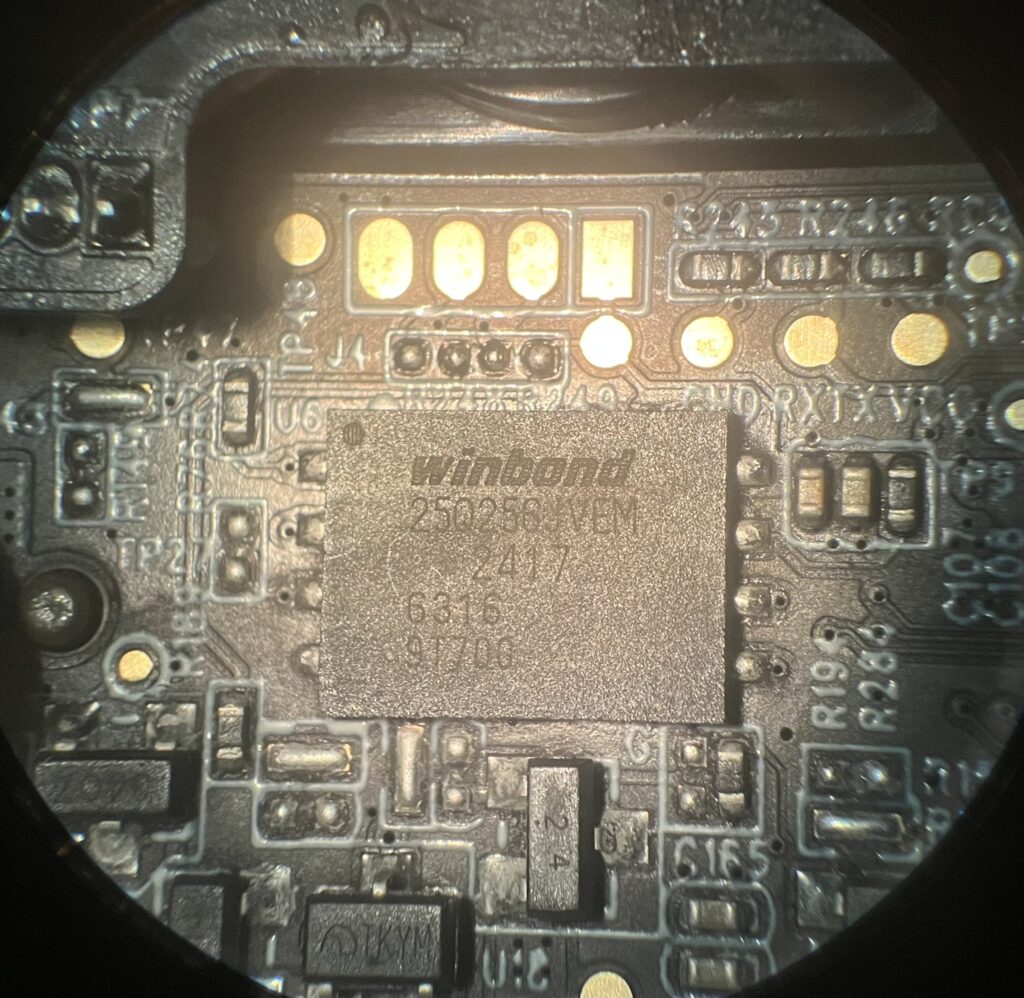
The HP5-Ultra features a new, larger capacity EEPROM (Winbond 250256JVBM) 256 Mbit (vs. 64 Mbit in the earlier HP5) part. Critically, it has a different package which has solder contacts on the bottom, mostly underneath the package, instead of on a set of leads around the edges. This makes it all but impossible to remove without damaging the circuit board or other nearby parts. It also makes it very difficult to attach a test probe, as I have done with previous models, to read the EEPROM contents with a logic anayzer.
Secure Boot
But there is something even more problematic, and it goes by the name “Secure Boot”. The ARM-processor-based iCatchTek V55 SOC in the HP5 Ultra supports a feature designed to prevent unauthorized firmware (like my hacks) from running on the platform. To do this, the binary program stored in the EEPROM is cryptographically “signed” during production of the factory firmware. When the SOC boots up, it checks this signature and aborts if the signature of the new firmware does not match the one it has stored. The signature is said to be “cryptographically secure” in the sense that it is practically impossible to generate a valid signature for a new firmware binary without knowing a secret key held by the factory. This even though you can tell what the signature is for the factory firmware, and any factory firmware updates.
So, the gig is up, I’m afraid. Fortunately, I have a great number of other projects to keep me busy, and add to practice of camera trapping.
Conclusion
We had hoped that this camera would offer an incremental improvement on Browning’s “high image quality” SpecOps and ReconForce camera line. Unfortunately, it does not for bright daylight images. Indeed, despite the move from a Sony Exmor R 2.1 Pixel sensor to Sony Starvis2 5.1 MPixel sensor, and a more powerful SoC, the bright daylight images from the HP5-Ultra are often worse than the earlier HP5 models. This makes the slightly higher power consumption of the HP5-Ultra more annoying, since we don’t get higher image quality in return.
Browning did make a major improvement in image quailty with a recent firmware update which removes pixelated artifacts from video, but in the opinion of this reviewer, still has more work to do. The HP5 Ultra Spec Ops does offer an improvement in nighttime image quality, and is as good as the HP5 in low light conditions, but for for users seeking the best quality in all lighting conditions, this camera will be disappointing.
Comments
Browning Elitę-HP5-Ultra Trail Camera Review and Teardown — No Comments
HTML tags allowed in your comment: <a href="" title=""> <abbr title=""> <acronym title=""> <b> <blockquote cite=""> <cite> <code> <del datetime=""> <em> <i> <q cite=""> <s> <strike> <strong>