Browning Dark Ops DCL Nano (BTC-6DCLN) Review and Teardown
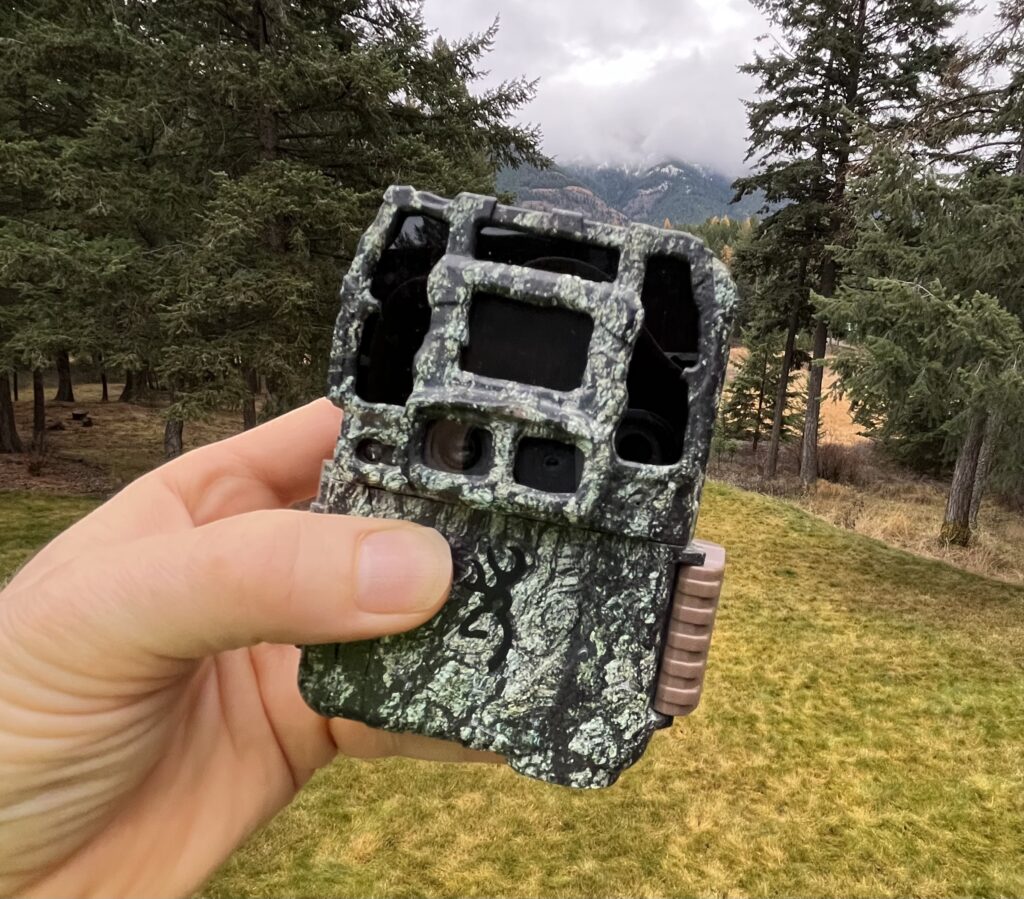
Browning recently introduced a new model in their 6-series Dark Ops trail cameras — the DCL Nano (BTC-6DCLN). This camera is small and light and features a silent, two sensor camera architecture. Lab measurements show that it operates at low power, especially at night. Image and audio quality is acceptable, though not this camera’s biggest advantage.
In this post, I look at the DCL Nano in inside and out.
I am grateful to the folks at trailcampro.com who donated the camera I’ve used for this review. Be sure to checkout their website for a detailed report on this camera.
Features
Here are some key characteristics of this camera:
- Small Overall Packaging: This camera is about half the volume of the ReconForce and SpecOps cameras that we usually use. With a full complement of 6 AA EUL batteries, it weighs about 350 grams (0.8 Lbs.) Compare this to 450 grams (1.0 Lbs) for a fully provisioned ReconForce or SpecOps model. The smaller size also means that a steel security box for this camera is substantially smaller and lighter than for larger cameras.
- Dual Image Sensor: The DCL Nano features 2 image sensors — one for taking IR images at night; and the other for taking color images under natural light. Dual sensors means there is no “click” from an IR filter motor, which can be very important when capturing images of particularly skittish targets.
- Higher Photo and Video Resolution: This camera supports 4K video (at 30 FPS), as well as high resolution photographs. We’ve found, however, that images are often interpolated, and that other factors, such as light sensitivity and motion blur. The proof is in the resulting still and video images, which I’ll cover shortly
As a result of the smaller size, there are a couple of tradeoffs Browning has made, including:
- Smaller LCD screen: The Nano DCL has a color 40 x 30 mm LCD screen used for configuring the camera and playing back photos and videos. Using it for the menu system is fine; but it can be hard to see animals in the video frame in “playback” mode. You may want to carry an SD card reader for your phone or tablet computer if you need to reliably review photos and videos in the field.
- Smaller Battery Compartment: This camera take 6, rather than 8, AA batteries. However, because it uses a more efficient video chip, it has about the same battery life in terms of hours of video as models, like the SpecOps/ReconForce that use 8 batteries.
Camera Performance
Here is a quick overview of some of the key aspect’s of this camera’s performance.
Dual Image Sensor
There are two advantages to the dual image sensor architecture in this camera. The first is that there is no “IR filter motor” typical in single image-sensor models. These motors make a small “click” when actuating, which can spook some species and/or individual animals. See: Trail Camera Noise: Part 1 — Clicks. The dual sensor DCL Nano is, in contrast, silent.
The second advantage is that with this architecture, Browning is able to use an IR-optimized sensor for night photos and videos. In measurements in the lab, I found that IR-illuminated night scenes require less light from the “flashes”, resulting in substantially less power consumption for night time captures.
I was hoping to be able to figure out what type of sensors Browning is using on this camera by examining the firmware. I am able to do this on other Browning models. Unfortunately, the Nano’s use a different processor and firmware environment, which I have not yet figured out.
Video Quality
I found the image quality on the Nano’s to be merely “adequate” despite the advertised 4K resolution. This compared to the benchmark Browning ReconForce and SpecOps models. I found this to be true for both daylight and especially night-time images. In the video companion to this post, I’ve included examples from both camera models under similar lighting conditions. The low-light conditions, under tree cover, in these sets is challenging, but typical of many of our sets.
The Nano supports 4K video resolution (3840 x 2160) mode operates at 23 FPS. In 1920*1080 resolution mode, the camera operates at 60 FPS. We generally prefer 60 FPS operation, especially for capturing quickly moving animals. Unlike some other 4K camera’s I’ve looked at (see Inside the Bushnell Core DS 4K Trail Camera and Inside the Stealth Cam DS4K Trail Camera), operating at the lower resolution and higher frame rate does not seem to improve the overall video quality in the Nano DCL.
The Nano also uses a newer, more efficient compression algorithm (H.264), which uses roughly half the SD card space, for a given amount of video, vs. the older SpecOps and ReconForce models.
Color vs. B&W Field of View
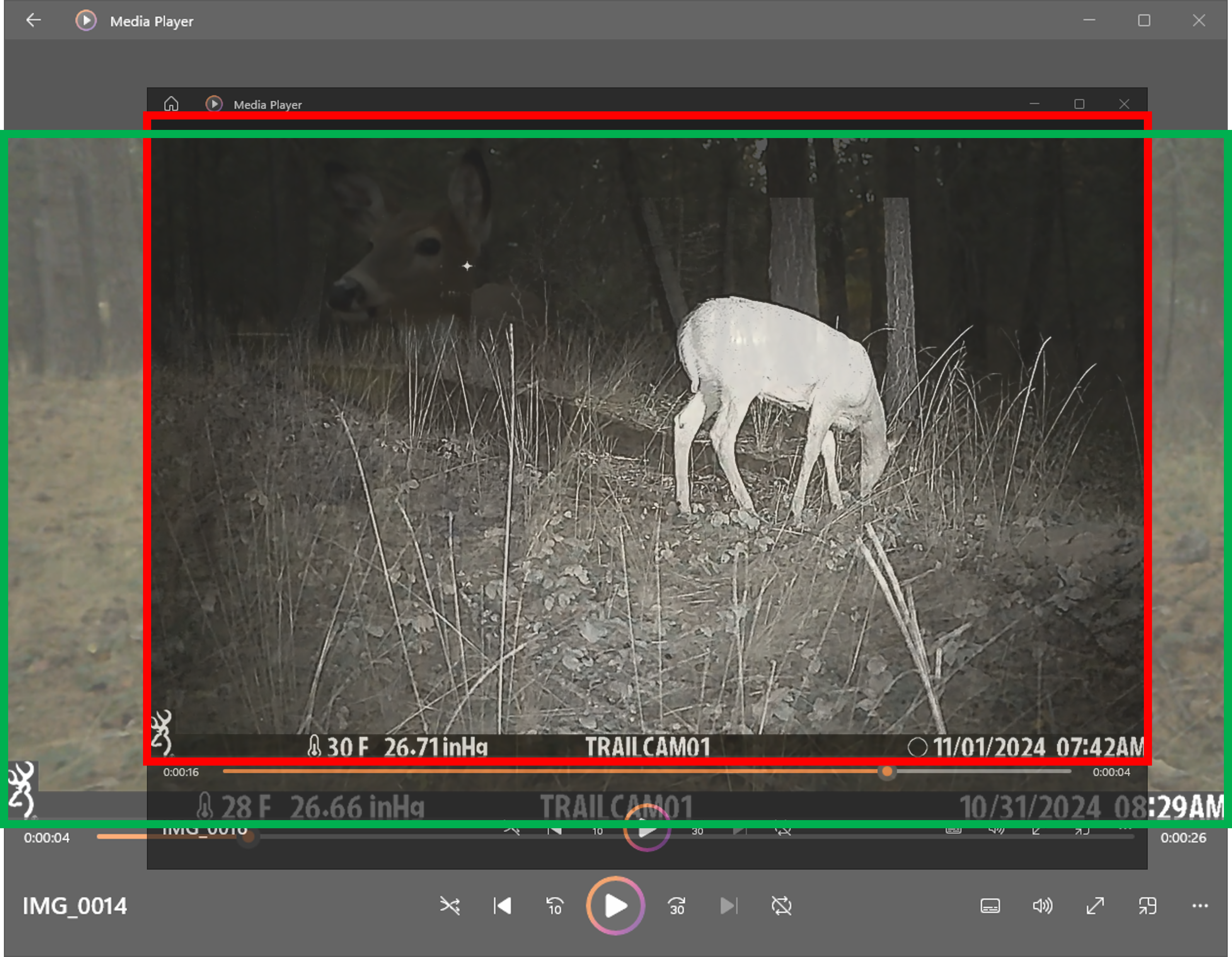
Because this camera uses two different sensors, and two different lens systems, the Field of View (FOV) of daytime color and night time black and white images can be different. This can be important for some applications, especially those that may try to correlate features of images taken during the day or at night. I found that the FOV of color images on this camera are significantly larger than those of the black and white images. To illustrate this, I superimposed a B&W image onto a collar image, and then resized the B&W image until the key background features matched. See photo below. Note that the the images are also not identically centered, a result of the horizontal separation of the two sensors.
Sound
I discovered that one of the strengths of this camera is the audio. In the video clip above, check out the (unaltered) sound levels as the video switches from the lower sensitivity HP5, to the higher sensitivity Nano DCL.
PIR Detector
I notice that this camera uses a different detection zone architecture vs. other Browning cameras. See Deep Tech: Trail Camera Detection Zones. In particular, it seems to have 4-5 zones vs. the 3 in typical in the ReconForce and SpecOps models we’re more used to. The downside of having more detection zones in essentially the same PIR sense aperture is that each zone “sees” less IR light, and is therefore less sensitive. In an unscientific test, I found that one of our SpecOps HP5 cameras triggered about twice as often covering the same (busy) site.
Teardown
The Photo below shows the back of the PCB for the Nano4K.
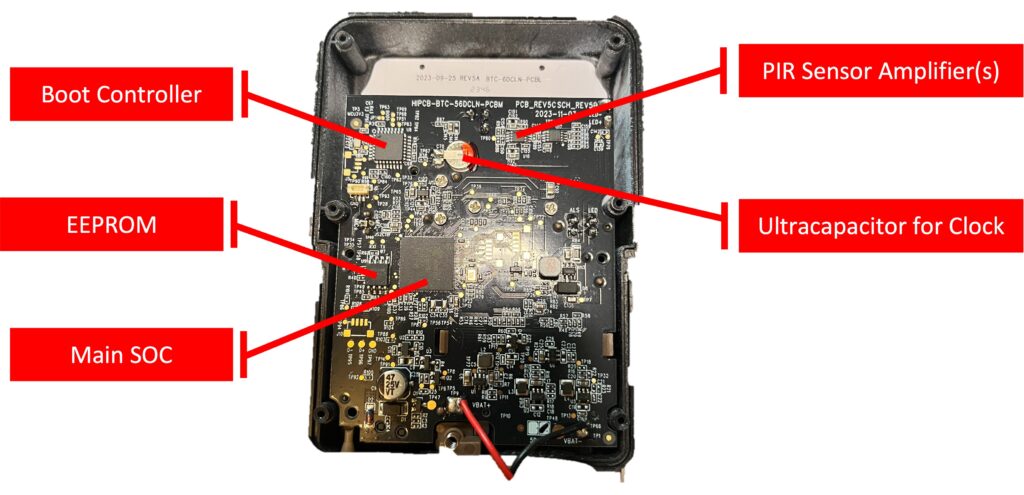
For reference, I also provide a list of the key components and their function in the table below.
| Identifier | Markings | Notes |
| U7 | Novatek MT96565MQG 2339AJ TNWT1500 | This is an SOC specialized for video processing. It includes at least one ARM core processor. |
| U9 | Winbond 25Q64JV | 64M-bit Serial Flash Memory |
| U8 | STM32L | Ultra low power 32-bit microcontroller likely used as a system boot controller |
| U16, U17 | SGM8142 YMS8 2250C | High precision dual operational amplifier which can operate from 1.4V to 5.5V single supply, while consuming only 350nA/amplifier quiescent current. Used as an amplifier for PIR detector |
| C70 | 3.3V, 0.2F | Ultracapacitor used to store power to keep the real time clock active when main batteries are changed. |
The build quality for the camera looks good, overall.
Serviceability vs. Reliability
This camera requires several connections from the PCB to elsewhere in the case. These include connections to the battery, the LED flash array, the microphone, light sensor, and the aim test LED. In other cameras, these are connected with wires from these devices. In the DCL Nano, this is only true for connection to the main batteries, which come through red and black wires hand soldered to the board. The other connections come from “header blocks” that push up through the holes in the main PCB during final assembly, and are then soldered in place.
In my experience, hand-soldered wires tacked directly to the PCB are a major source of unreliability in these cameras, mostly due to the occasional cold solder joint. The DCL Nano solves this problem by connecting these to the main PCB with some through-hole headers which are hand-soldered into the main PCB as a final assembly step. Soldering a through hole pin is much less prone to error than tacking down a wire, which likely improves the reliability of these connections.
Unfortunately, it also means the the PCB, even when unscrewed from the case, cannot be removed without desoldering these header connections. I wish the designers had used socketed header sets, instead. This might have been cost neutral, since the small additional component cost could be balanced by elimination of a hand solder step in final assembly. Critically, for service of these cameras, it would allow the PCB to be removed without desoldering 8 headers.
Summary
I found this DarkOps DCL Nano trail camera has a number compelling advantages:
- Small size and light weight: This camera is easier to get into and out of the field. This is a real win if you are deploying a number of cameras in remote locations.
- Low power consumption: This camera gets as much done with 6 AA batteries as we’ve seen in cameras with 8. It could save you 25-30% in batteries, and even more if you are taking primarily night-time video. This could be a significant advantage if you are using premium non-rechargeable batteries (e.g. Energizer Ultimate Lithium)
- Low Impact on Wildlife: This camera is ideal for skittish animals (e.g. canids like wolf and coyote). It doesn’t make any “clicking noise” since it doesn’t need an IR filter motor. The very sensitive IR sensor means less LED light, which also less noticeable to animals.
- Good Quality Audio: This camera provides very good quality, loud, and distinct audio.
- More Efficient Video Compression: The Nano DCL uses H.264 compression, which reduces SD card usage. Combined with low power operation, this could make the Nano DCL ideal for long term deployments in remote locations.
The small LCD screen that comes with the small package is not ideal for reviewing photos and videos in the field. Users who want to check SD cards in the field will probably want to bring an SD card reader for their smart phone or tablet.
Build quality for this camera is good. Elimination of hand-soldered wires from the LED flash array and microphone will likely improve the reliability of this camera, even as it makes it harder to repair if/when it does fail.
I found the higher resolution video and photos touted for this camera to be less compelling. We found that we generally preferred the image quality of our SpecOps and ReconForce models.
Comments and Feedback
Have you used the Dark Ops DCL Nano trail camera? How do you like it? Let us know in the comments below.
Why do you think the 60 frames/ sec only comes on in the lower video quality setting? I’d not heard of that before. Looks like an interesting camera.
I can think of two reasons. First is fundamental — Higher resolution means smaller pixels, which means less light for each pixel. Operating at 23 FPS gives more than 2x the exposure time per frame, and therefore 2x the total light to these smaller pixels. This factor of two may be critical to reducing graininess in each frame. It may also have something to do with limitations of the hardware compression engine, which may only be able to “keep up with” a given pixel rate. Pixel rate is pixels per frame * frames per second. Thus, to operate with the higher resolution 4K image, the engine may require a slower frame rate. Unfortunately, these are just guesses because I was unable to find a spec for the SOC, or the type of image sensor(s) 🙁
I would love to give this camera a try. Thanks for your review.
OK! Will contect you via email shortly.
I wonder when Browning will realize that there is a large and growing audience for those who are interested in wildlife camera trapping. I love my BTC 7E HP5’s, but there is always room for improvement. Thank you Bob for your excellent review of the BTC-6DCLN. For me, this camera is a step in the wrong direction.
Thanks for commenting, Tom. Yeah, I sort of had the same impression. Improving battery life and reducing size are good, but doesn’t address the image quality issue. To be fair, the BTC-6DCLN is tiered in a lower cost category than the HP5s (despite a couple feature inversions). Perhaps the next camera in the SpecOps/ReconForce line will include (at least) a newer version of the Sony sensor.
I am very reluctant to buy Browning. They take no responsibility for their poor soldering on the PCB, not answering phone calls when their product fails, and the corrosion on the PCB because they have used the wrong flux. The corrosion was so bad that the batteries no longer worked.
You can see these at https://gideonlabs.com/posts/browning-trail-camera-recon-force-failures/
Thanks for a pointer to this great teardown and failure analysis. A conformal coating on the PCB would definitely make trail cameras more moisture tolerant. Alas, I am not aware of any trail camera manufacturer that has engineered a conformal coating into their platform design. This is not trivial, as you know, since there are certainly parts in the current PCB design which cannot be conformally coated – e.g. the image sensor, any connectors, and the pushbutton.
Thanks for the update re: flux. This issue wouldn’t be that hard to fix in principle. I suspect Browning’s contract manufacturers use the same PCB production line as “indoor only ” consumer electronics to save money. Have you looked at other trail cameras to know whether the Browning branded cameras are outliers?
All the trail camera manufacturers I know of rely on a housing which is waterproof, or at least water resistant. None that I’m aware of are actually certified to IP68 (capable of being submerged).
I did find, when I took apart the ReconForce and SpecOps Edge series cameras that the rubber gasket between the front and back plastic housing was noticeably less robust than in the previous Advantage series cameras. Thankfully, the later Elite-HP4 and HP5 series addressed this problem. We have used the HP4 and HP5 model cameras extensively in temperate environments, always inside steel security boxes, and they have stayed dry on the inside. That said, I’ve heard that none of these Browning models is up to deployment in very high humidity settings, like rain forests.
Reconyx is known for their robust enclosure design. We have not used these cameras extensively because of their high cost, and lagging technology. The just-released HyperFire 4K addresses these issues, somewhat, and may be an alternative for high humidity sets.
Thanks for this review, Bob.
I have been looking at these as possible research cameras – I like the improved IR video quality of separate optics, even though it comes at the cost of a small lateral image shift between daylight and nightime, which makes precise location of scent-marks difficult.
Patriots have excellent IR video, and are no-glow, but the nighttime FOV is narrower than the daytime FOV and the PIR detection zone, which is irritating. Did you look at the angualr FOVs on the Nano?
And, does it have live-screen aiming, or is the screen only for set-up and playback?
Thanks, Peter Apps
Thanks for pointing out the possibility of a discrepancy between day/IR image FOVs! I went back and grabbed an IR and daylight capture and used some PowerPoint trickery to size the images so that the background features were the same size, in the same place. See new section in updated post, above. Unfortunately, this image hacking shows that the FOV for the IR images in this camera is indeed substantially smaller than for color images. Thanks for prompting this quick edit of the original post.
This camera does feature “live screen aiming”, though, as I noted, the small screen makes finding small features in the preview image tricky.
Thanks Bob
I have a batch of these destined for field research – the difference in FOV coupled with the narrower detector angle is going to be a headache. I should have held off ordering until your results were in! Also, the detection at higher tempratures (above 25C) becomes really weak and eratic – I have returned some units to Browning for their “diagnosis” but it look to me as if the flat PIR lens buckles when the camera gets hot.
That’s too bad about the different sensor images. I tried 🙂
I didn’t get the chance to test this camera at different temperatures. I agree that a warped Fresnel lens is like to change engineered detection zones for the worse. Interested to hear what Browning has to say. Now that you bring it up, I have noticed that some of our older Browning cameras suffer from small, but visible deformation of the Fresnel lens. These continue to trigger, at least sometimes. Your note reminds me to systematically find and replace these lenses!
Great camera good quality pictures the only problem is you better be used to being satisfied of only seeing them on the little tiny screen on the camera, I have gone to extremes to pull the memory chip out and put it on to a tablet my laptop my full-on computer nothing will ever work! On any of my other 30 cameras on the ranch I pull the chip out and I put it into a computer in the field and voila I have my pictures on the computer! Not with Browning! Very unimpressed.
You should definitely be able to view the photos and videos taken with your BTC-6DCLN (or any other Browning model) on a Mac or PC, and probably an iOS or Android Tablet. We always do our best viewing on a full sized screen, and regularly use both a PC and a Mac (and occasionally iPad). Depending on your OS version, and viewing application you may need to download and install the right “CODEC” (Coder-Decoder — the piece of software that knows how to read a particular video format). I the Nano uses a newer (more efficient) CODEC, which may be causing you trouble. I would type “codec browning DCL nano for ” into a search bar and follow resulting advice.
Too late now but how about a head to head image comparison between the Nano and the previous 6DCL?
Yes — sorry — too late.