
Browning Elitę-HP5-Ultra Trail Camera Review and Teardown
Browning recently released the latest model in SpecOps/ReconForce line of cameras, the Elite HP5-Ultra. Readers of this blog will know that we have a lot of experience with the SpecOps/ReconForce family going back to the Advantage series cameras. We have thousands of camera hours on these cameras. We bought 5 of the new SpecOps Elite HP5-Ultras when they first came out.
Updated April 25, 2026: As we had hoped, Browning took the image quality issues with the early HP5-Ultra models to heart and developed new firmware for this camera. I have updated this post based on evaluation of an original HP5-Ultra camera with the latest firmware update from Browning. There is good news. This latest, “3rd generation” firmware seems to have fixed the image quality issues associated with earlier firmware. With the new firmware, the HP5-Ultra provides improved image quality over the HP5 “classic” at the same resolution and frame rate (FHD @ 60FPS), and better resolution at the new QHD, 60 FPS “ULTRA” video quality in the HP5-Ultra. Search for “UPDATED” in the following review to see things that have changed from my original post.

Teardown
The HP5-Ultra shares the same physical packagaing as earlier the earlier HP5 models. I took apart a new HP5 Ultra, and found that the LED flash, the boot controller and PIR mechanisms, the LCD display, and keyboard are all carried over from the earlier HP5 models.
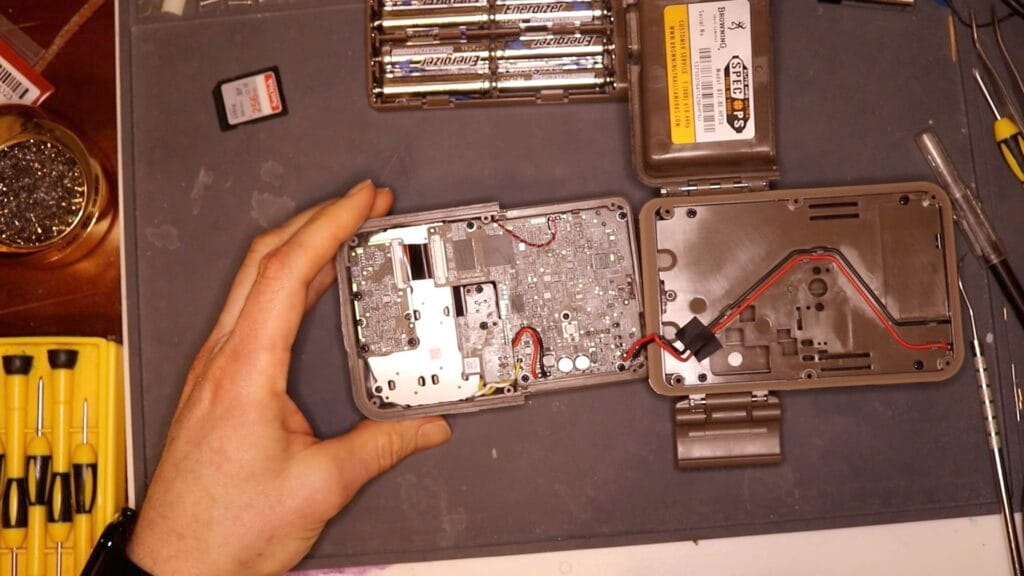
I did find two substantial new additions: new SOC (System On Chip) and a new image sensor.
Image Sensor
The specs for this new camera are very similar the earlier HP5 model. The key difference is an advertised doubling of the sensor resolution. Earlier models of this camera, going back to the Advantage, have a sensor resolution of 2.1 MPixels (1920 x 1080). The new HP5-Ultra improves on this resolution, and features a QHD (2560 x 1440) video resolution at 60 FPS in “ULTRA” video quality mode. The advertised photo “resolution” of 48 MPixels is the result of the firmware and hardware “interpolating” pixels based on the data from the raw sensor, so is a less reliable indicator.
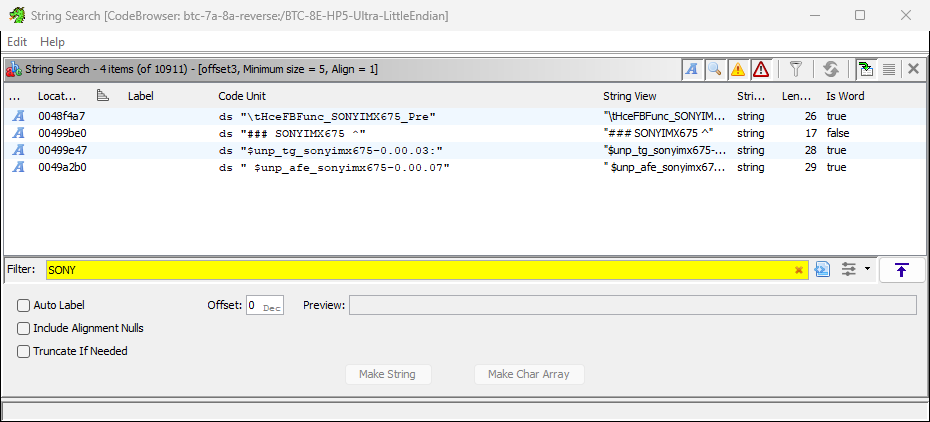
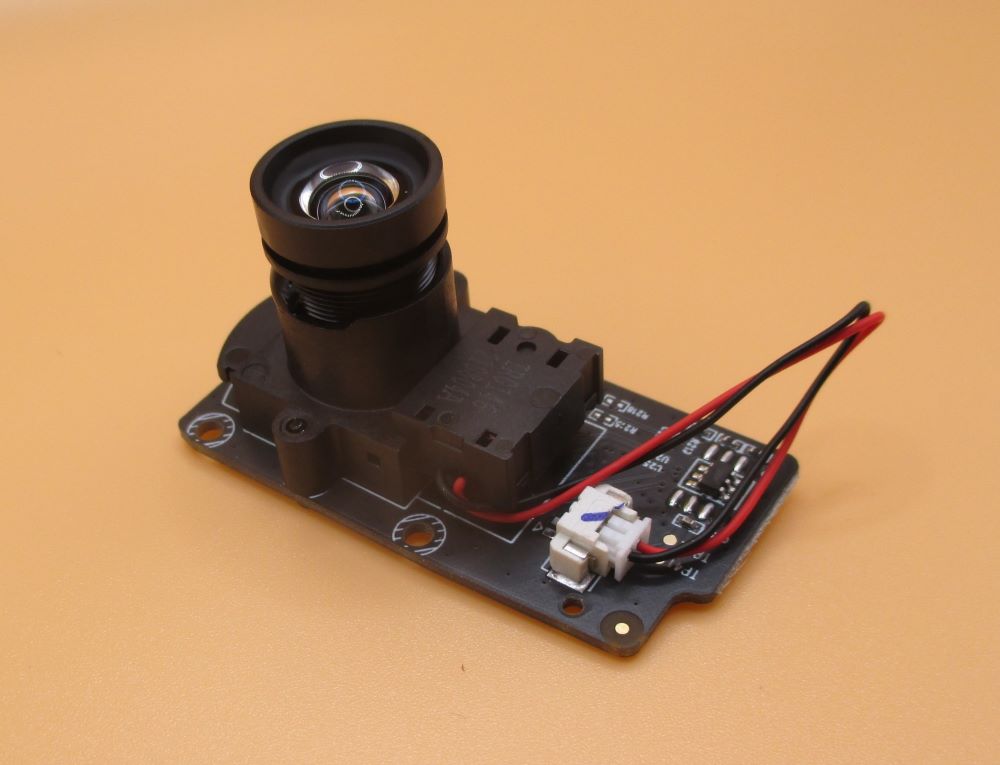
The Elite Series system design introduced an internal architecture where the camera sensor is on a separate PCB from the main compute board. The new HP5-Ultra takes advantage of this architecture by offering a new sensor board. The sensor board includes the image sensor itself, the IR filter and motor, and the camera lens. It’s very difficult to determine the make and model of the sensor by visual inspection. Fortunately, I was able to analyze the latest firmware drop for this camera and figure out that the HP5 Ultra firmware is using a SONYIMX675 image sensor. This is a legit 2608 x 1960, 5.1 MP Starvis2 sensor. This is an improved technology sensor vs. the ExmorR tech in the IMX327 sensor used in the earlier , HP5.
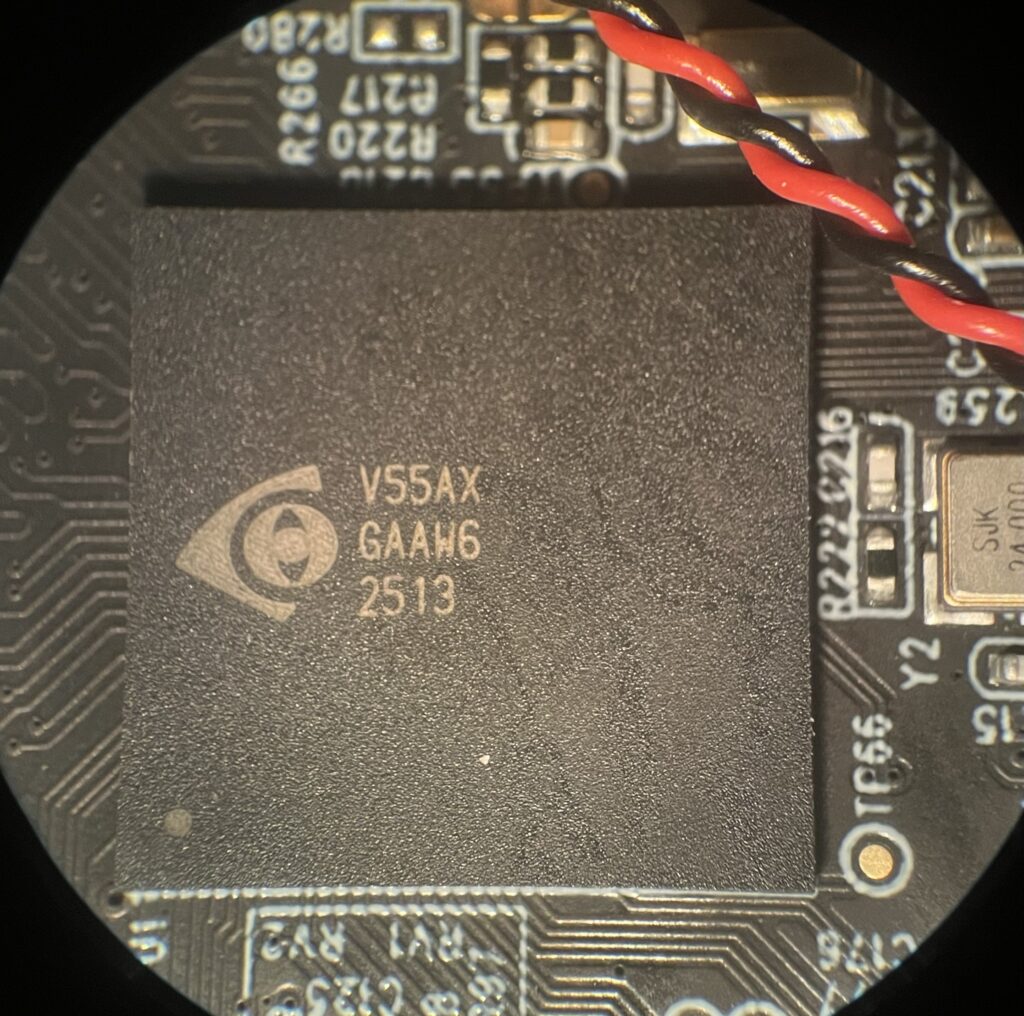
iCatchTek V55AX System on Chip
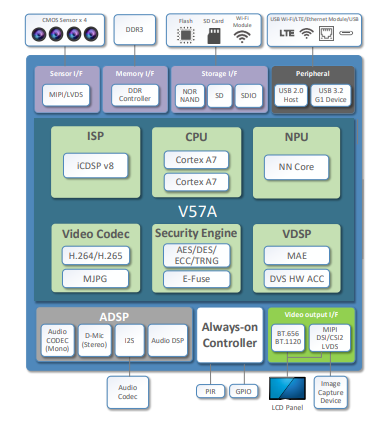
A visual inspection of the HP5 Ultra main circuit board shows that the iCatchTek V38 SOC used in earlier cameras has been replaced with the newer, faster iCatchTek V55AX. The closest thing I can find online for documentation on this device is for the V57A, and it is quite sparse, but is revealing. The V57 features two high performance ARM CPUs (vs. a single MIPS core in the V38), and several new hardware pipelines for image processing. Critically, the V5x family supports UQHD resolution at 30FPS, and QHD resolution at 60 FPS. The latter is the new “ULTRA” video format for the HP5 Ultra.
The V57A includes several new hardware features which I don’t believe are used by the current firmware. These include:
- An “AI-based denoise engine”: This could, in principle, be used to further improve low light performance, using AI models to correct grainy photos or videos on the fly, as is done in modern smart phone cameras. I don’t think this feature is used, or perhaps it is, in which case it needs some major tuning.
- An NPU for AI-image recognition support: This feature is used in security systems to dynamically identify people or objects in a field of view. It hasn’t been used in trail cameras, I believe because passive benefits are outweighed by the energy cost of executing complex, power hungry models on a limited battery power budget.
- An”always on” controller which supports processing of data from a PIR sensor and an internal RealTimeClock. These could be used in the future to eliminate external components, but I don’t think this optimization has been made yet.
Getting My Hopes Up
Bottom line, the HP5 Ultra ought to be able to match, and even improve, on the HP5 “classic” image quality based on the underlying sensor and image processing hardware.
Image Quality
UPDATED 2026-04-20
Early feedback to Browning distributors pointed to serious problems with image quality in the new HP5-Ultra cameras. As a result, Browning introduced a “2nd Generation” firmware image to address these problems. These solved some, but not all of the image quality issues with the original factory firmware, prompting Browning to release a “3rd Generation” firmware (“BTC8EHP5U_Q03311F“).
In this section, we’ll see how they did. I’ll give examples below of all three firmware versions.
I set up tests with three cameras: a SpecOPs Elite HP5 (classic), a SpecOps Elite HP5-Ultra with “original” (factory original firmware, “BTC8EHP5U_P1124OF”), and HP5-Ultra with “2nd Generation”firmware (“BTC8EHP5U_QO2020FT”), and finally with “3rd Generation” firmware (“BTC8E_HP5U_Q03311F”).
The cameras are placed as close as possible to each other, pointing in the same direction, and triggered at the same time. Date and time stamp are (mostly correct), showing that the lighting conditions are the same for each. I took landscape and close up videos under bright daylight, and low light dusk conditions. For 3rd generation firmware testing, I focused on bright light conditions, which is where the original and 2nd generation firmware struggled.
See the videos below for examples to back up the text in the following section.
Video
UPDATED 2026-04-20
Thehe HP5-Ultra, with 3rd generation firmware does a better job than the HP5 classic in bright conditions, doing a slightly better job in not washing out bright backgrounds. In doing this, it also does a better job than the HP5 Ultra with original and 2nd generation firmware. This is great news, as it means buying the new HP5-Ultra slightly improves upon the older (no longer available) HP5 .
The new HP5 Ultra 2nd and 3rd firmware fixes the pixelation problems with the original firmware. The 3rd generation firmware does not wash out the background in bright light conditions.
In low light conditions, the old firmware in the HP5 Ultra produced pixelated detail vs the HP5 Classic. The new Hp5-Ultra firmware seems to fix this. The 3rd generation firmware, seems to improve on the overall color accuracy vs. the Ultra with 2nd generation firmware, and the older HP5.
The HP5 Ultra with 3rd generation firmware is an improvement over the original HP5 and the Ultra with original and 2nd generation firmware in all lighting conditions I measured.
Nighttime Video a Bright Spot
I did find the nighttime video for the new HP5-Ultra, even with the original firmware, is at least as good, to may eye, as the HP5-classic. This ought to be the case, since the IMX675 Starvis2 sensor is more sensitive to IR than the older ExmorR IMX327 used in the earlier HP5. To my eye, the HP5-Ultra clip on the right captures more slightly more detail of the animal, the ground litter, and even the tree needles.
Still Photos
I found that the 3rd generation firmware has the same positive effect on still photos.
I did do some comparison tests between the stills taken with HDR “OFF” and “ON”. In principle, “HDR” (or High Dynamic Range) should improve the image quality of photos with bright and dark areas. I found this effect to be small, and that it did not fix what appears to be a fundamental problem with exposure settings.
New Video Quality Option (Updated 2026-04-20)
The original HP5-Ultra had only two video options: “High” (FHD at 30FPS), and “Ultra (QHD at 60 FPS). The HP5-“Classic”, on the other hand, offered “High” (FHD at 30FPS) and “Ultra” (FHD at 60 FPS). This was frustrating because it meant that the HP5-Ultra couldn’t operate in the same “FHD at 60 FPS” mode as the earlier HP5-classic.
Fortunately, the 3rd generation firmware fixes this problem. Now the HP5 Ultra offers Video Quality options of : “Normal” (FHD @ 30 FPS); “High” (FHD @60FPS; and “Ultra” (QHD at 60 FPS).
This means that camera trappers who don’t need the increased resolution can operate the new HP5-Ultra in “High” (FHD @ 60FPS) and get more or less the same video file sizes and same battery life as the HP5 “Classic”.
Other Findings
Image quality is definitely the lede for this review, but I did document a few other changes.
Field of View
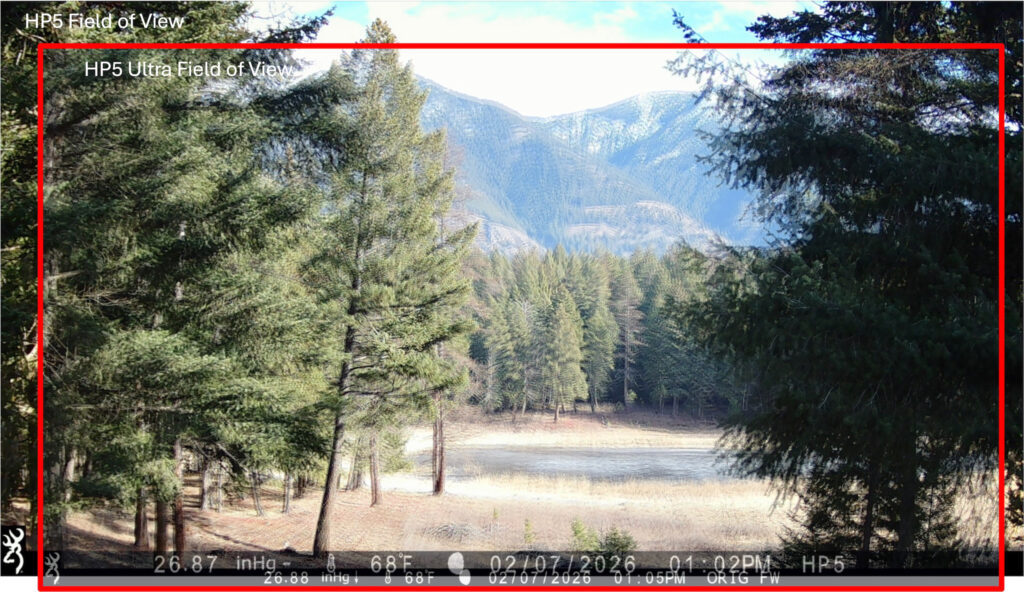
The HP5 Ultra appears to feature the same wide angle lens introduced in the HP5 series (see: DIY: Trail Camera Lens Hacking). We like this lens a lot since it allows us to get a view of more animal in tight sets. The images are not exactly the same — the new HP5 has a slightly narrower field of view. I believe this is because the final image is “cropped” — and only uses 4.1 Pixels of the available 5.1 MPixels on the sensor.
The HP5-Ultra appears to operate in a “cropped mode” in which it only uses the central 2560 x 1440 pixel window within the overall 2608 x 1960 physical sensor size. This results in a slightly smaller field of view than the HP5, despite having essentially the same lens.
Power Consumption
Updated 2026-04-20 for HP5-Ultra with 3rd Generation Firmware
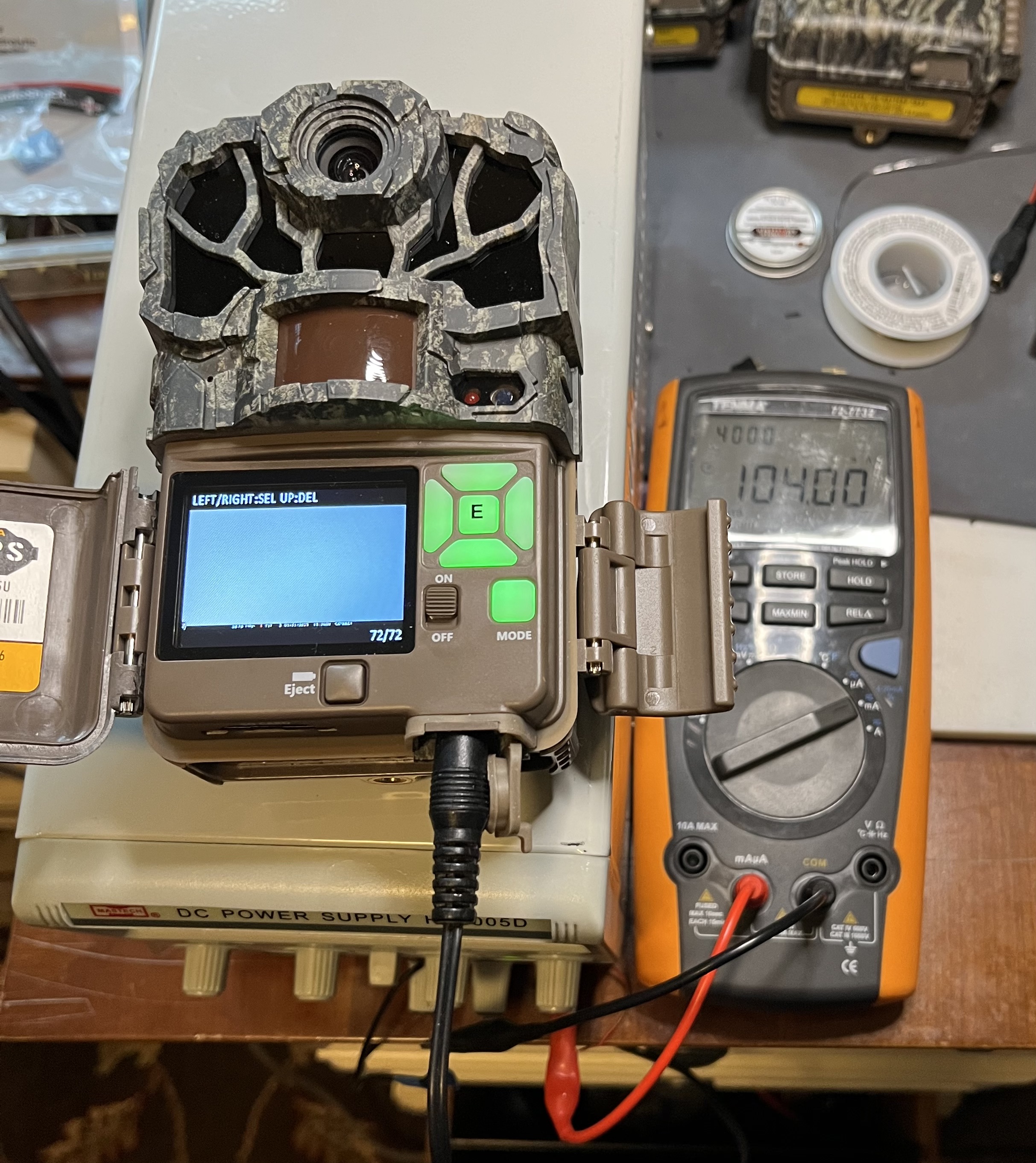
I measured the power consumption of the new HP5 Ultra in the lab and compared it to the earlier HP5 model. I measured four operating points: sleep ; in PLAYBACK mode; taking daylight video; and taking nighttime video with the LED flash. When taking video, I measured power of the HP5 in ULTRA (FHD) quality, and the HP5-Ultra in HIGH (FHD) and ULTRA (QHD) video quality modes. Here’s what I found.
| Operating Point | SpecOps Elite HP5 | SpecOps Elite HP5-Ultra | |
| Ultra (FHD at 60FPS) | High (FHD @ 60 FPS) | Ultra (QHD at 30 FPS) | |
| Sleep | 820 uW | 1000 uW | 1000 uW |
| Playback | 0.66 W | 1.4 W | 1.4 W |
| Daylight Video | 1.98 W | 2.1 W | 2.5 W |
| Night Video | 3.96 W | 4.7 W | 5.0 W |
Sleep Mode Power
The HP5-Ultra consumes 25% more power in sleep mode. This likely due to a new “always on” portion of the new iCatchTek V55 SOC. The new SoC includes built-in-support for a PIR device, which the designers could use this to replace a small, ultra-low-power microcontroller that was needed on previous models to monitor the PIR sensor while the SOC was off. This would substantially reduce the standby power, but for now, the extra “always on” circuit in the SoC is just adding to the power consumed while the camera is asleep. In principle, the increased sleep power will reduce the amount of time the camera can be left in the field, and/or to reduce the battery capacity available to take videos or photos. In practice, it might reduce the maximum field time on a set of Lithium batteries from 5.1 years to 4.1 years. Alternately, over the period of 6 months, it might reduce the amount of video that can be taken by 30 minutes.
Daylight Video Power
UPDATED: 2026-04-19
The HP5-Ultra with 3rd generation firmware uses about the same power while taking daylight video in FHD resolution at 60 FPS (HIGH in the HP5-Ultra settings) , vs. the HP5 in FHD resolution at 60 FPS (ULTRA in the HP5 settings).
The HP5-Ultra at its maximum QHD resolution and 60 FPS uses 2.5 W, which is about 25% higher power than the maximum FHD resolution of the HP5. Video files size for the QHD/60FPS “ULTRA” video quality in the HP5-Ultra is about twice the file size of the FHD 60FPS mode.
This means that the higher resolution option in the HP5-Ultra comes at a cost of about 25% in battery life, and twice the required SD capacity. Users who are limited by either may want to consider using the “HIGH” video quality option in the HP5-Ultra to get the performance as the HP5.
Nighttime Video Power
Nighttime video, using the IR Flash set to “Long Range”, the HP5-Ultra consumes about 13% more power than the HP5, regardless of the video resolution. I would expect the power to be lower in the lower resolution setting, but perhaps there is something about the B&W processing pipeline which causes it to operate at the higher resolution.
Playback Power
During playback, the HP5-Ultra consumes more than twice as much power as the HP5. This probably reflects lack of adequate power saving optimizations in the higher performance SoC.
Power Summary
The HP5-Ultra consumes more power, in general, than the HP5. Some of this is likely fundamental, due to the higher video procession load of the QHD resolution video. Other increases, like the increase in playback power, might be solved by a firmware fix. The higher sleep power can likely only be solved with a new board design.
Relatively Smaller Info Strip
With the higher video resolution on the HP5-Ultra, the text in the info strip consumes less of the area in the recorded video. This is typically fine for viewing footage on big screens. Unfortunately, Browning continues to rely on the info strip in “playback” mode to provide meta-data about the capture — especially the date and time. On earlier models, it was almost possible to read the date and time on the camera’s 2-inch preview screen. Not any more. IMO, Browning should display the data and time of the current video or still in playback mode in large, legible type on the preview screen, especially now that the info strip is all but invisible on the preview screen.
Fixing Bugs?
Earlier versions of the HP5 had a hardware/firmware bug which could lead to card corruption and early battery drain. See: Fixing Browning Edge, Elite HP4 and HP5 SD Card Corruption. This bug was due at least partially to the inability of the SD card interface to support higher speed SD card operation, and failure of firmware to limit SD card speed to those the hardware did support. The new SOC on the HP5 Ultra supports current, high speed, high density SD cards, so hopefully this bug has been fixed. Let’s hope so.
The End of Firmware Hacking
Those who follow our blog know that I have spent some time and effort reverse engineering the Browning SpecOps and ReconForce camera lines, starting with the Advantage, and up to the early instances of the Elite HP5 Models. This has allowed me to create my own firmware images which add some features, as well as fix a bug. See: New Features for Browning Recon Force and SpecOps Cameras, Fixing Browning Edge, Elite HP4 and HP5 SD Card Corruption, and Deep Tech: Hacking Trail Camera Firmware 1 — Overview
I have always known that there were some relatively simple things Browning could do to make this type of firmware hacking much more difficult if not impossible. And, with the HP5 Ultra, this has come to pass.
There are new physical, and (more importantly) cryptographic barriers introduced in the HP5 Ultra that make hacking the firmware all but impossible.
Hard to Remove EEPROM
The new physical barrier is related to the EEPROM which stores the operating system and trail camera application, and which is loaded every time the camera is turned on or wakes up to take a picture or video. Access to this EEPROM and its contents are key to the practical side of debugging “without a net.” That is, during attempts to add new code, bugs are almost unavoidable. When these happen on an embedded system like a trail camera, they often “brick” the system. The only recourse is to remove the EEPROM, reprogram it with a known good image, and try to figure out where you went wrong.
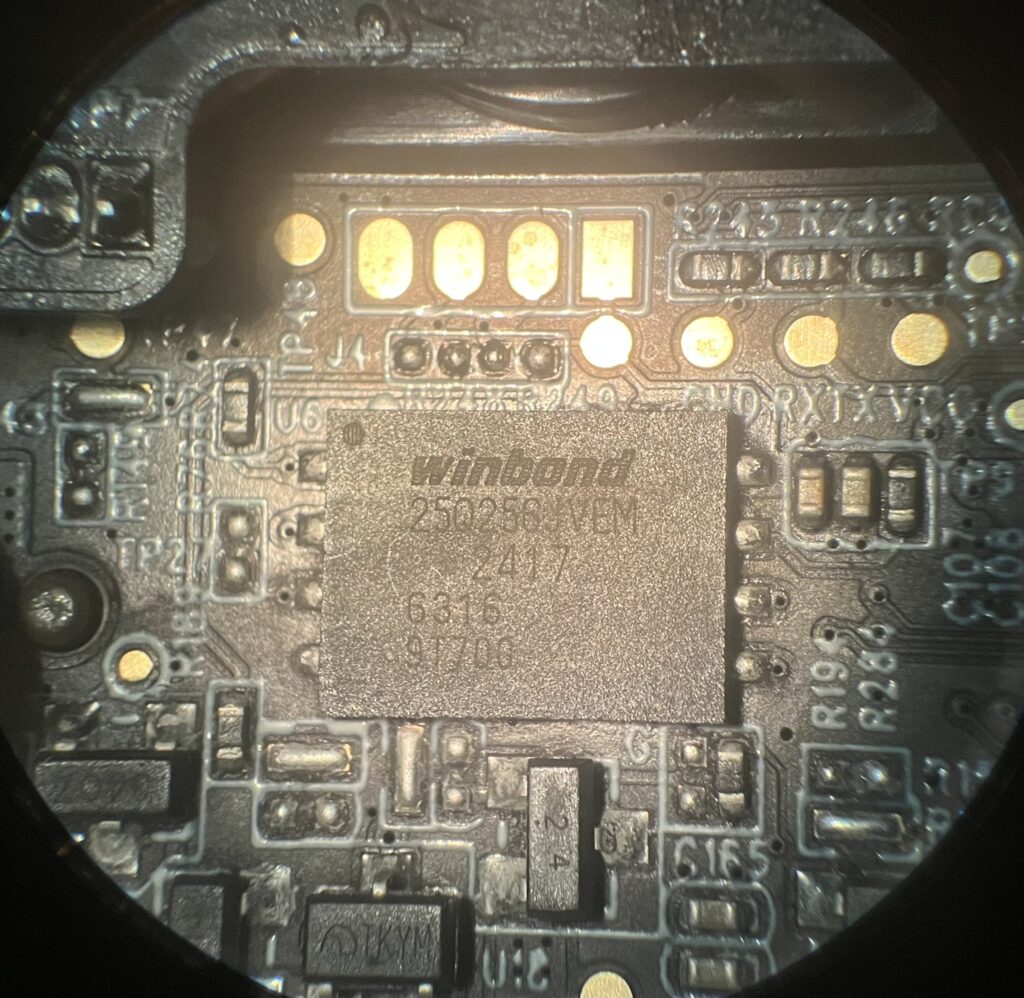
The HP5-Ultra features a new, larger capacity EEPROM (Winbond 250256JVBM) 256 Mbit (vs. 64 Mbit in the earlier HP5) part. Critically, it has a different package which has solder contacts on the bottom, mostly underneath the package, instead of on a set of leads around the edges. This makes it all but impossible to remove without damaging the circuit board or other nearby parts. It also makes it very difficult to attach a test probe, as I have done with previous models, to read the EEPROM contents with a logic anayzer.
Secure Boot
But there is something even more problematic, and it goes by the name “Secure Boot”. The ARM-processor-based iCatchTek V55 SOC in the HP5 Ultra supports a feature designed to prevent unauthorized firmware (like my hacks) from running on the platform. To do this, the binary program stored in the EEPROM is cryptographically “signed” during production of the factory firmware. When the SOC boots up, it checks this signature and aborts if the signature of the new firmware does not match the one it has stored. The signature is said to be “cryptographically secure” in the sense that it is practically impossible to generate a valid signature for a new firmware binary without knowing a secret key held by the factory. This even though you can tell what the signature is for the factory firmware, and any factory firmware updates.
So, the gig is up, I’m afraid. Fortunately, I have a great number of other projects to keep me busy, and add to practice of camera trapping.
Conclusion
With the latest, “3rd generation” (Q03200T) firmware, Browning has rescued its latest offering in the “high image quality” SpecOps and ReconForce camera line. The latest firmware enables the improved underlying hardware: a Sony Starvis2 5.1 MPixel sensor, and a more powerful SoC; to improve the image quality relative to there earlier HP5 models. Operating at the same video resolution and frame rate as the HP5, the HP5-Ultra uses about the same power as the HP5. When using the new, higher resolution QHD at 60 FPS video in the HP5 Ultra comes at a power premium of about 25% vs. the older HP5.
In workiing through the issues with its original firmware, Browning has shown a willingness to address image quality issues raised by their users, which is reassuring and encouraging.
Thanks for the detailed and unbiased review. I was in the ” Stand By Mode ” wanting to replace a number of cameras with the Ultra. I’ll put that on hold for a while.
Thanks Again
Jim
Glad you found this useful, Jim. It was a disappointing review to write 🙁 Hopefully, I will have to publish a an update with better news soon.
PS: Janet and I really like seeing your captures from MA!
Thanks, Bob,
Unfortunately, we’re not getting our money’s worth at the moment. But I hope Browning has got to work on it. They’ve proven themselves capable of quickly adapting firmware after the first complaints about the HP5 Ultra started pouring in. Although I fear that Browning will only really tackle all the problems once sales collapse…
Who on the development team came up with the ridiculous idea of removing the 1080P 60fps setting (present on the HP5 classic) and leaving only the 30fps option on the HP5 Ultra? This is truly incomprehensible.
Browning really needs to be careful not to lose its reputation and market share, because there are already cheaper brands with a Sony Starvis on the market. Customers who abandon a brand do not return quickly. We have already seen Moultrie almost completely disappear from the scene, while Bushnell, fortunately, quickly realised that they had made mistakes and have at least taken action. But whether the owner of Browning (Prometeus) really cares about what the small trail camera division is doing remains to be seen.
For now, I am giving Browning the benefit of the doubt. The Sony Starvis does offer the possibility of achieving very good results, which would allow Browning to remain one of the top choices for many trail camera users.
PS. Bob, do they still have that same small internal (problem) battery installed in the HP5Ultra?
Thanks, Gerard! I’ve just learned more about the complex tech supply chain it takes to design and build one of these cameras — so many opportunities for failure. The subject of a future post. In the meantime, I’m 100% with you on Browning/Prometheus dropping the ball on this. Market share disappears in a heart beat, takes a long time to win back! Perhaps this will spur them to add an “image quality” sign-off criterion to their contracts with their suppliers.
And, yes, looks like same small ultra cap powering the RTC during battery swaps; same SMD PCB tech.
Hi Bob,
Even if software does a lot in imaging module, I’m wondering if the Icatch v55 is good enough to work with imx675 sensor.
Other trail cam manufactuter such as izeeker are using Novatek 96670 which seems to be really better.
What do you think?
Nicolas.
Reminder that I haven’t been able to find a spec sheet for the iCatchTek V55, so I’m basing my response on the V57. Google Gemini rates the V57 is a “better” chip for trail camera applications. Here’s the prompt I used: “compare icatchtek v57 vs. Novatek NT96670 for trail camera applications”
The Novatek part is an older. Gemini seems to think it as a Boot-wakeup speed of 1-3 seconds (vs. < 0.15 seconds for the V57). Do you see a really slow trigger time for the izeeker? The V57 has an onboard NPU for AI applications, missing in the Novatek part, though this appears not to be used in the HP5 Ultra (yet). Perhaps this indicates a strategic direction, though.
Hi,
I often use gemini but i take answers with some distance.
For izeeker ig600 using this novatek multimédia processor, wakeup time is very speed & gives 0.2 0.3s for photo vidéo
Did you notice hp5u trigger time for photo? It’s amazing, 0.04s!!! While vidéo is about 0.3s. I think stand-by mode is différent with the Icatch processor to wake up faster which explain higher stand-by current
About 60uA vs 30uA for hp5
Anyway, i do not explain so Bad vidéo quality for hp5 ultra.
Hope they will understand that people doesn’t want hp5 u with lower quality than hp5.
New sensor should give so good results, hope for new firmware update
Thanks for the info on the izeeker ig600. Sounds like Gemini was confused, and/or the engineers have worked around a limitation in the SOC.
I did not measure the trigger time for photos or videos, but 40 ms would be excellent. Is this something you measured? I see that TCP lists it at 20 ms (even better!). I’ll definitely take a look at this when I update my review for the rumored second firmware update for this camera.
I think the higher stand-by-current is because the V55 has its own “always on microcontroller”, as well as PIR sensor input. However, the HP5 Ultra also has the legacy discrete “always on” STM microcontroller which was required with earlier SOCs. My hunch is that the manufacture decided to keep the old mechanism in to limit risk, and reduce new firmware effort for the first product. It seems likely that they will use the new SOC function eventually, since it will allow them to remove the STM part from the BOM. This should substantially reduce standby power. In the meantime, the HP5 Ultra has a slightly higher standby power.
As I’m working for STM, I hope they will keep the legacy 🙂
And yes I’m doing a lot of test for various trail camera such as consumption, trigger time, recovery, etc & the 40mS in photo mode is just awesome, even if for video it’s about the same as for hp5
Wait, what? STM shouldn’t be happy with the (disappearing) boot controller!
Doesn’t STM have an SOC that competes with the iCatchTek or GTek SOCs?
-bob
32 bits STM is sold in tenth of million units per year but I was very proud to see it in browning cam, even if very low volume. We’ll see what happen next.
STM is a very large company with a lot of activities with a major american smartphone manufacturer… mainly in the imaging division I’m working for, but we do not design Soc, market is already saturated with asian manufacturer.
No – I get it (I once worked for Intel, after all). Still, it’s frustrating that the trail camera technology ecosystem is so vertical on Asian suppliers.
Interesting stuff Bob. Have you found a way to have cameras write to storage that is not onboard, without needing one of the companies apps? I am looking into it now and see you have done way more research and trial than I have. Any insight is appreciated.
I have not done any reversing of cellular cameras. But that won’t stop me 🙂 My guess is that there is a configuration file on one of the embedded EEPROM based file systems which tells the camera who to talk to on the cellular network. In principle, if you can find this file, and update I with the address of your own “listener” you could grab the images directly.
[If the network addess is built into the firmware image itself, as opposed to a configuration file, the task is *much harder*. This because it seems like most cameras are now using SOCs which support (cryptographically protected) “secure boot” to validate a firmware image]
Of course, you would have to reverse engineer the protocol and build that into your listener.
You will also have to deal with whatever authentication and security the camera vendor has built into their firmware images. This could range from generating a simple checksum, to hacking some cryptographic image protection.
Some of the tools I built for reversing the firmware may be useful to you. Make sure to checkout post series Deep Tech: Hacking Trail Camera Firmware 1 — Overview, which includes pointer to my github site where all these tools live.
If you decide to go down this path, happy to consult.
Hi Bob, thanks as usual for sharing your detailed work on this. Incredibly disappointing to hear of ‘cryptographic barriers’ that will prevent you from doing Browning’s job for them as you have with the older HP5’s. All the best from Germany 🙂
Thanks. I have mixed feelings about the cryptographic barriers. On the one hand, it marks the end of a project. On the other hand, I have lots of other projects in mind. Stay tuned to see if any of them pan out.