Timelapse Feature Enhancements for Browning Trail Cameras
Timelapse photography is used in many applications to capture action that takes place over long timescales. The “Timelapse” mode in Browning Trail cameras is designed for a specific use of timelapse photography, typically for hunting. In this post, I describe several enhancements I have added to the Browning Timelapse mode to enable a broader set of applications. These enhancements are available for Browning Edge, Elite-HP4, and Elite-HP5 trail cameras.
Custom firmware images with these features can be found on my GitHub Site. Note that installing this firmware may void the manufacturer warranty. The GitHub site also includes factory firmware images, and instructions for re-installing factory firmware if the camera requires warranty service.
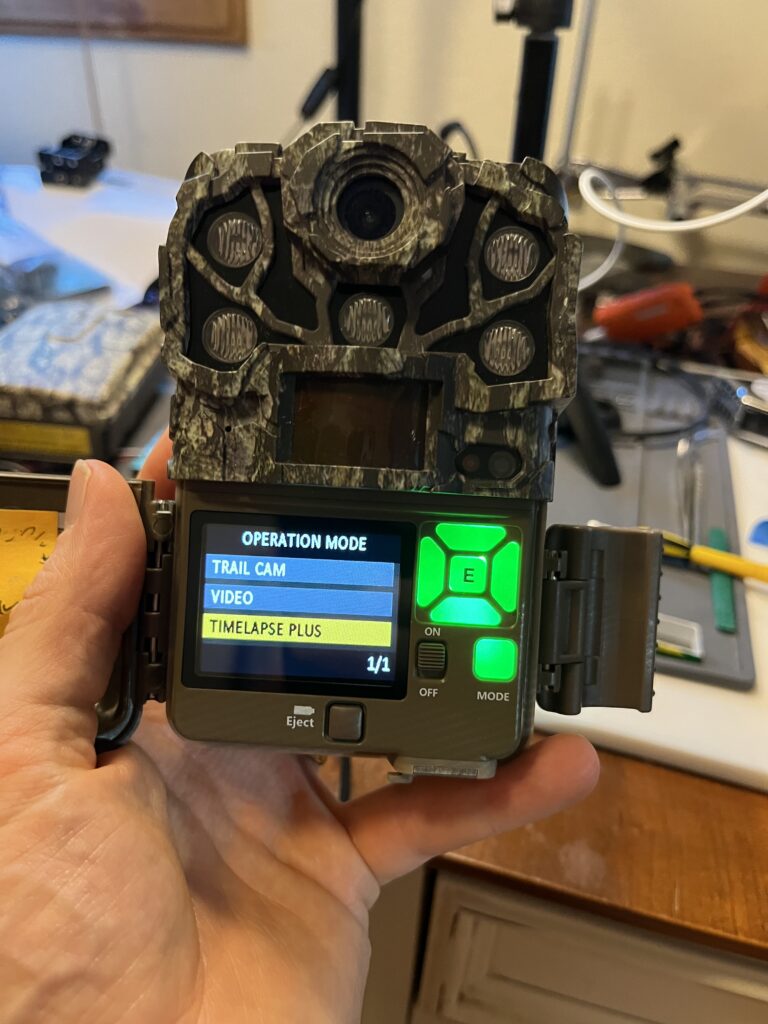
Browning Timelapse Mode
The Browning Timelapse Mode (sometimes called “Plot Mode”) is designed to survey a large area for groups of animals, especially deer. In this application, the individual animals may be too far away to trigger the PIR sensor, so capturing images “every so often” is a better alternative.
Since the animals are far away, the flash is also not likely to be effective. To save power and reduce the number of “empty” images, the factory firmware works hard to only take photos during the day.
Timelapse Period
The “Timelapse” Period menu is used to set the daylight times that the timelapse mode is active. The periods of “1, 2, 3, 4” hours are all referenced to sunrise and sunset. For example, with a Timelapse Period of 3 hours, the camera will take periodic photos starting at sunrise for 3 hours, and then continuing 3 hours before sunset to sunset. A setting of “All Day” will take periodic photos for the complete interval between sunrise and sunset.
There is some adaptive behavior in the firmware to track sunrise and sunset. The algorithm starts by assuming sunrise is at 6:00 am, and sunset at 6:00 pm. It adjusts these values by 15 minutes each day based on the light level at the current estimate of sunrise and sunset.
Timelapse Storage Format
Timelapse images are stored in a series of “*.TLS” files in a folder on the SD card called “TLS”. Browning provides a PC-based application called “Timelapse Viewer Plus” which can parse the TLS files. The app can present them as a movie, or as individual frames. The application also has some ability to detect frames with animals in them.
The .TLS file format is the same as one of the several .AVI formats. This is why simply renaming the file from *.TLS to *.AVI allows other video viewing applications (including those on Mac) to view the timelapse files.
New Timelapse Features
I’ve added three new features to Browning Edge, Elite-HP4, and Elite-HP5 Trail cameras.
Shorter “Timelapse Frequency”
The factory firmware supports timelapse “Frequency” settings down to 5 seconds. In some timelapase usage models, users may want a more precise timestamp for animal activity. For this reason, I added “Timelapse Frequency” settings of 1 and 2 seconds. In conjunction with the addition of a “seconds” field in the info-strip, this gives second-resolution timing information for timelapse images.
Timelapse File Format
In some applications, it is useful to process timelapse files as a series of .JPG image files, rather than as an aggregated .TLS file. This makes it easier to process the individual photos in a custom AI tool flow. It also provides a precise timestamp in the EXIF data (the .TLS file does not save the capture time of each frame, except on the info strip).
Note that the Browning “Timelapse Viewer Plus” application can also process a bunch of .JPG images. This is done by choosing the “camera” icon rather than “movie reel” icon in the top left corner of the splash page.
All Day/Night Timelapse Period
I added a menu item in the “Timelapse Period” menu for “All Day/Night”. This causes the camera to take timelapse photos as long as the time is within the time-of-day specified in the “Active Menu”. This defaults to 24 hours/day.
When the “Timelapse Format” menu is set to generate *.TLS files, timelapse photos taken at night will be in color. The camera will not use the flash. This mode could be useful, for example, to capture the aurora borealis, sunrise, or sunsets, or in sets where there is an external night-time light source.
When the Timelapse menu is set to .JPG, timelapse photos taken at night will be in black and white. The camera will use the flash. This mode could be useful, for example, when tracking the 24-hour growth of plants deep in the Everglades, far away from night-time ambient light.
Feedback
Let us know if you find any uses for these Timelapse feature enhancement in comments below.
Loving the deep dive series – I don’t have a personal need for time lapse – but your breakdown of how it works “vanilla” and explanation of your modification makes a lot more sense than the Browning version. Having that info has me thinking about another camera for a different purpose.
Shame you’re not on commission at Browning 🤣
I know, right?
Depite reading the Browning users manual, I didn’t really understand all that was going on with the Timelapse function until I was fairly deep into the code. I figured others might be similarly confused.
I’m working not the next installment of “Camera Hacking” now 🙂
Hello Bob,
I am a researcher in Ottawa, Canada. The timelapse enhancements that you’ve coded could be very useful for a project I’m working on. I have a few questions I’d like to ask, any chance you can reach out to my email?
Thank,
-Steve
Yes, of course. Stay tuned.
I got my Browning camera on Monday and thought I would set it up to document the snow storm due on Wednesday night. I was disappointed to see the standard settings would not allow time lapse overnight. Disappointed, I did some googling and found this site. Downloaded the firmware, installed it and it worked like a charm. Thanks so much!
Glad you found us and that the Timelapse extensions I added worked for you! Thanks for letting us know.
Dear Zak Bob,
Your post about time-lapse camera trapping for Browning cameras has caught our attention at the Institute for Research in Game Resources (I.R.E.C, Spain). Adapting browning models to rapid time lapse 24 hours a day would be helpful for future research projects related to wildlife monitorng. We would like testing your software that modifies Browning cameras, but unfortunately, we don’t have the exact camera models for which you created this software. We were wondering if you could help us by creating similar software for one of the camera models used in Spain.
The camera models we have are:
Browning Dark Ops Pro X 1080 (BTC-6PX 1080)
Browning Dark Ops HD Pro X (BTC-6HDPX)
Browning Stike Force Pro X 1080 (BTC-5PX)
Your invaluable help would be of great value to us.
Thank you for your attention.
Marcos Jiménez and Joaquín Vicente
IREC
https://www.irec.es/en/
I’m glad you found us, and I would certainly like to help you and your worthy organization. Unfortunately, (I believe due to business reasons), Browning uses completely different hardware and firmware platforms for its different product lines. This would mean starting almost from scratch with the cameras in your list. I estimate that it would be at least a year’s effort (possibly closer to 18 months) to reverse engineer the BTC-6 series and BTC-5 series to the point where I could start porting/developing firmware enhancements. With several other projects in the queue, I just don’t have time for this 🙁 On the other hand, if you found someone with some hardware/firmware background who might be interested in doing and/or learning this type of work, I’d be willing to consult and provide advice, and (of course) provide access to all the tools/code I’ve developed so far. Let me know.
Hello Bob, I recently purchased a Browning HP5 camera and was very happy to find your modification files. I work at an environmental non-profit that will be using the cameras to track salamander migration movements across a road in timelapse mode at night. I was hoping there would be a way to have the capture timer settings apply to the timelapse mode, but that doesn’t appear to be the case. So I’m just curious, is there a way to have the timelapse mode only function between certain times? 8pm-6am for example? I don’t think there is, but I thought I’d doublecheck. Thanks much!
Hi, Jeff. Glad you found us. Per your request to have capture timer window apply to timelapse… This is a great idea! I thought that was the way I’d made it work. But apparently not. Filed as a bug against current release in GitHub. I’ll let you know when I get to fixing it.
Hi Bob, thanks so much! Is there any chance I could pay you to expedite the bug fix? Just curious, as our Salamander study will start in a week, and the timelapse timer window would be super helpful. Please feel free to email me to discuss further if interested.
Thanks again.
Next week !? 🙂
No need to send money — consider it my donation to your research. I’ll work on this over next couple of days. With a little luck, I’ll have a fix for you in time.
-bob
Hi Bob,
Wow, that is super generous of you! I really appreciate it 🙂
I work for an environmental non-profit, and I am using several cameras to monitor an annual salamander migration that occurs near my office.
They come down from the hills and cross a park road (which is temporarily closed for the migration) to breed in a wetland. I’m trying to determine where high concentrations of them cross, so we can install a tunnel under the road for them to use. It’s a pretty neat project, and the migration brings out community members, college students and kids to watch.
I really appreciate the work you are doing to improve the firmware on these cameras, and I wish you good luck on your bug fix!
Thank you for your work! Would it be possible to password-protect the camera?
Glad you find it useful. Alas, I’m stopping new work in “firmware hacking shop” for now (and possibly forever). Newer cameras have security features which prevent me from carrying these hacks forward, and I’ve accrued a number of other more pressing projects.
First of all, I would like to thank you for the great effort and dedication you put into documenting and explaining this project. I read your post and found it very interesting, especially the possibility of modifying the camera’s behavior through programming.
I recently came across some Strike Force HD BTC-5HD trail cameras that are completely new, but they had been sitting unused and stored away for quite some time. I have started experimenting with them because I work in glaciology in Colombia, and I am interested in exploring whether these cameras could be adapted for glacier monitoring.
At the moment, I am using the camera in Time-Lapse Plus mode. However, what I would really like is to have the camera take only photographs at regular, predefined intervals (for example, one photograph every 10 or 30 minutes), without triggering video recording whenever motion is detected.
This leads to my question: would it be possible to modify or hack the firmware, or write some kind of code, so that the BTC-5HD simply takes photographs at regular intervals, independently of the motion sensor?
thank you so much
Thanks! You may be in luck. It sounds like you just need photos taken during daylight?
If so, I think you can use these cameras without any firmware modification at all. Set the camera to “Timelapse+” mode, select the frequency you’d like (e.g. 10 or 30 minutes – I believe both are available in the standard firmware). Set the Timelapse Period to “All Day”.
Now comes the tricky part 🙂 take a piece of sturdy opaque tape (e.g. a piece of foil tape), and tape it over the PIR sensor. This will prevent the camera from taking and PIR triggered photos.
(I considered the same problem a couple years back, and a friend came up with the tape idea)
As for hacking firmware on the HD BTC-5HD. This may be possible, but it wouldn’t be easy. Browning’s tech contractor for this camera left fewer debug hooks than in the BTC-{7,8} models I was fortunate start off with. The critical difference between now, and when I started is the ubiquitous availability of AI Agents with LLMs, user defined context, and even hooks into power tools like Ghidra. It’s likely that using these tools would substantially reduce the effort to reverse engineer a solution for the BTC-5HD.
However… the golden age of trail camera firmware hacking has officially ended, as newer cameras with newer SoCs have a “secure boot” feature which requires that all firmware images be crypographically signed with a key known only to the manufacturer. 🙁
Hopefully, this is all academic, and the “tape” solution works for you.
-bob