Deep Tech: Analyzing Trail Camera Blurriness
We have found that some of our trail cameras, including some relatively new models, become blurry over time. I discussed diagnosing and repairing such failures in an earlier video here . This post is focused more on documenting the failure mode in hopes of allowing trail camera manufacturers to correct this serious and frustrating problem.
This post includes a description of some tools I put together to quantify and track image resolution over time. I also include some recent data where 3 identical cameras (Browing Elite HP5-Ultra) trail cameras were deployed at the same time, in the same general location, but in different microennvrionemnts. By tracking the blurriness over time this data suggests that cameras in open landscapes, exposed to direct or indirect sunlight, lose image resolution (become more blurry) over time, whereas images from a camera in a shaded environment do not degreade.
Thus strongly suggests UV damage as a likely underlying root cause for the blurriness.
Measuring Blurriness
In several of the cameras we’ve looked at, blurriness is easily visible just by looking at the image in a computer screen. But to track the image quality over time, we’d really like a way to qualify the blurriness so theat we can see how and and at what rate the image is degrading.
I’m no image processing expert, but I do know that there are algorithms out there which measure the amount of detail in a given image. Google Gemini suggested computing the 2D Laplacian.
Other Sources of Blurriness
In addition to lens-induced blurriness, there are several other reasons for less than sharp images:
- Sometimes, the scene itself may actually be blurry. The 2026 summer here in Montana featured many days where smoke from regional wildfires cut visibility to under a mile, rendering blurry or invisible mountain backgrounds.
- Sometimes early morning mist or dew settle on the lens, giving a dream-like video in the early hours of the morning, but allowing a sharp image later in the day.
- Sometimes a capture may include an animal which is so close to the camera as to be out of focus.
- In one of the cameras, a piece of sagepgress fell in front of the camera, creating a blurry region in one area of the image.
For all these reasons, in looking at the upcoming data, it’s important to look at the general clustering of image quality metrics, as opposed to any single point. I’ll make it clear what I mean by this below.
Tool Flow
As with all utility programming I do these days, I worked with Google Gemini to write and debug the code from a specification I developed. This allows me to quickly create utility programs and tools. Here’s the flow I worked out:
- Extract frames from a season’s worth of video captuers
- Extract the date and time, temperature, and whether capture was daylight (color, natural light), or night ( black and white, IR illuminated)
- Compute an Image Detail value for each of the frames
- Present this data in graphical format showing sharpness as a function to date
- Superimpose a Dynamic version of the graph on a timelapse movie for video presentation
Results
Here are the results of image sharpness analysis based on the calculated Laplacian in 4 different cameras. See the companion video, below, for images taken from the sets themselves.
River Bottom Camera
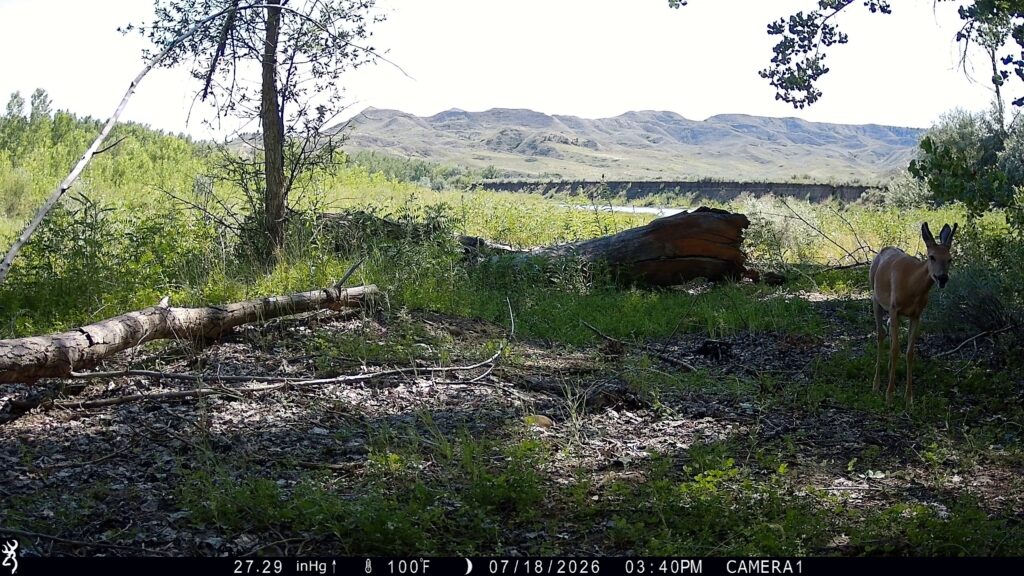
We sited the first to three reentry purchased HP5-Ultra cameras in the (mostly) shady river bottom, hoping to get animals walking along the river. In fact, we do capture several video clips of a mountain lion sauntering past the camera in both directions. Here is a typical frame of video from this site.
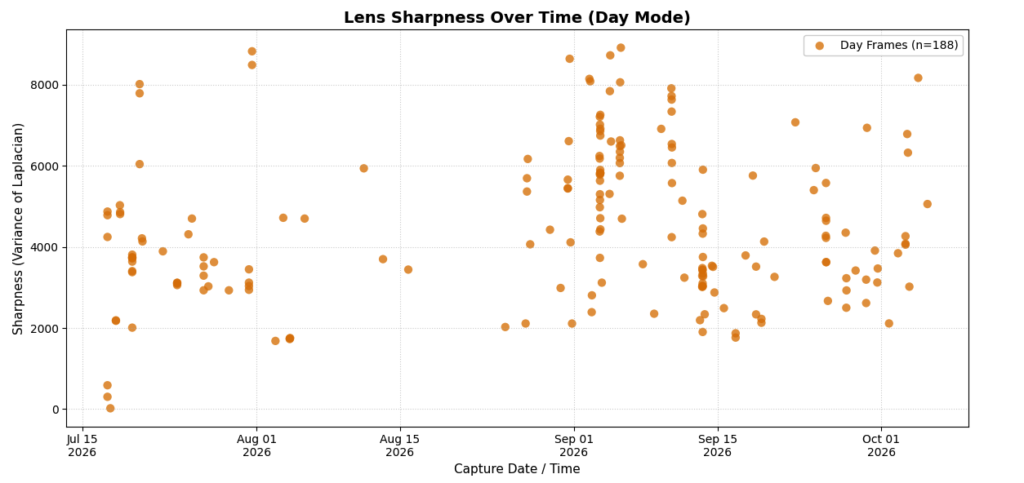
The graph below shows the Sharpness metric for images taken by a Browning HP5-Ultra trail camera set in a covered river bottom from July to October, 2026. As I noted earlier, there are many reasons for an image to have different sharpness, but the takeaway from this data is that the sharpness metric jumps around in the range of several thousand throughout the 3 month deployment. Also that the very last images are just as sharp as the ones taken in July.
Open Prairie Camera
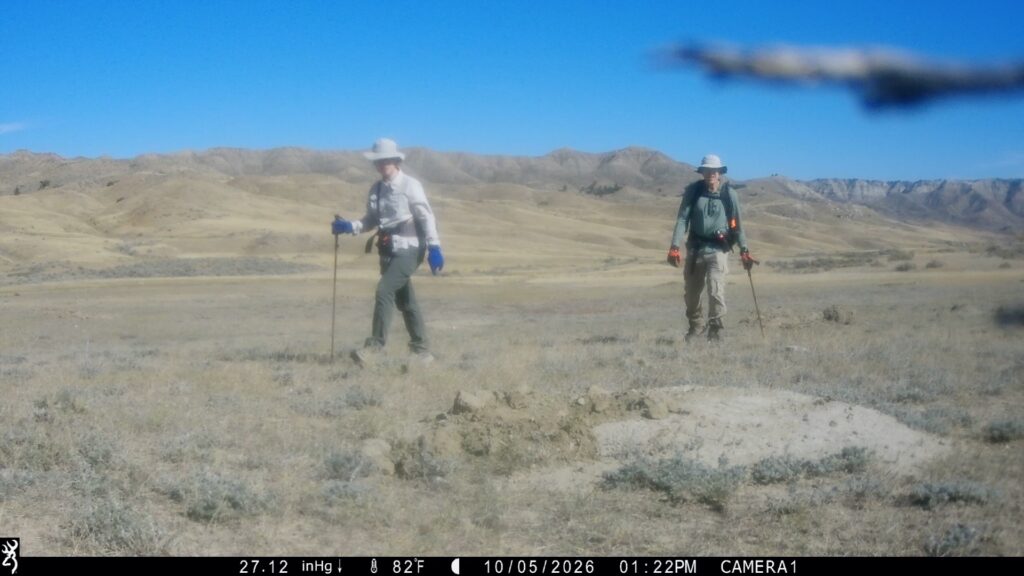
We placed two new HP5-Ultra trail cameras in the open prairie, both overlooking a prairie-dog village. We were hoping to get video of prairie dogs and their predators. Below are two image — one taken early in the 3 month summer deployment, and one taken towards the end. Note the qualitative drop in sharpness between the two images.
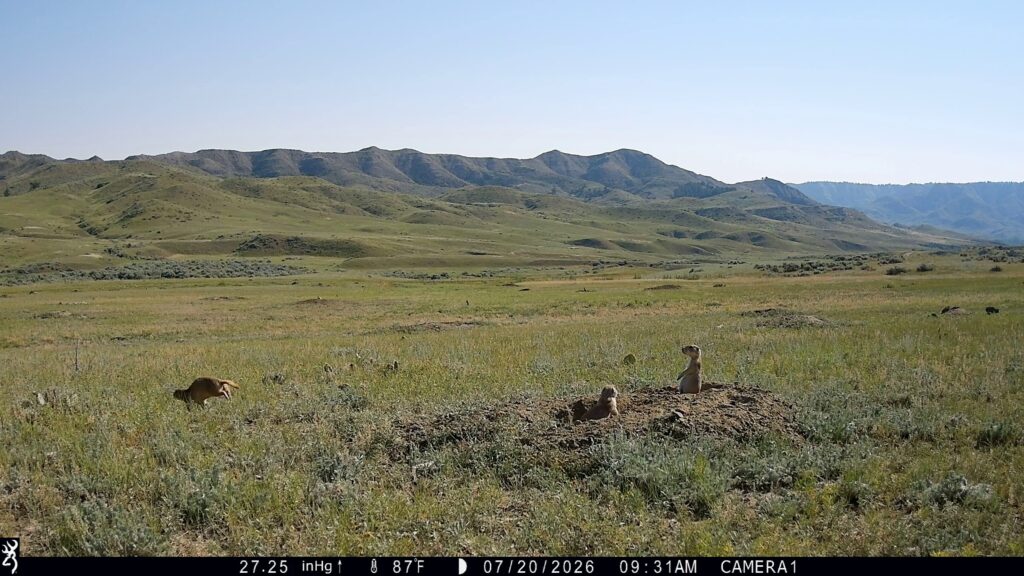
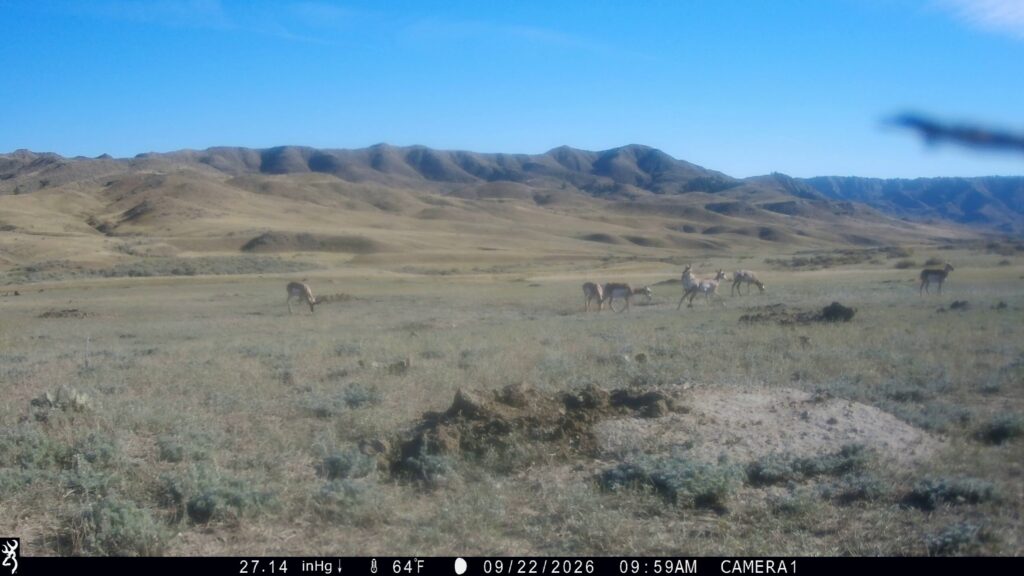
Although the images above clearly show a degradation in image quality, we can use a quantitative image sharpness metric to understand the nature of the failure.
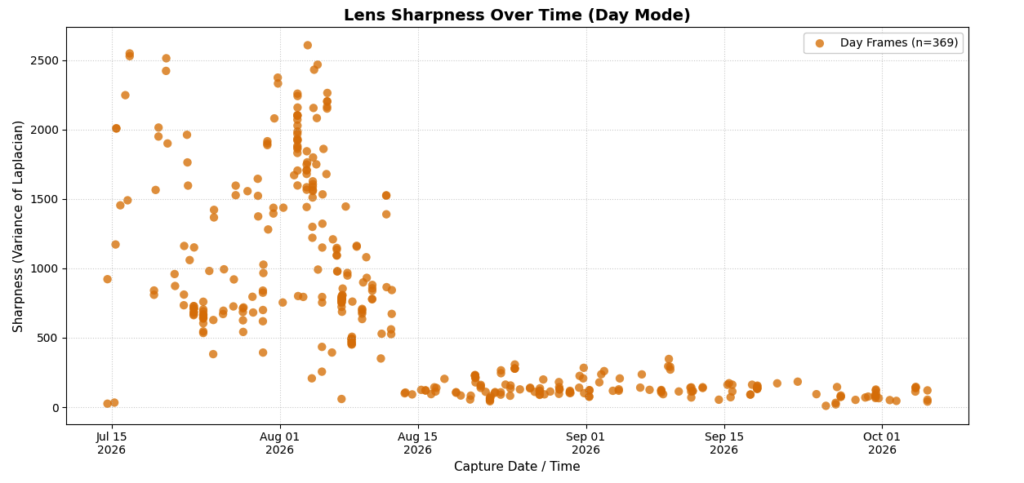
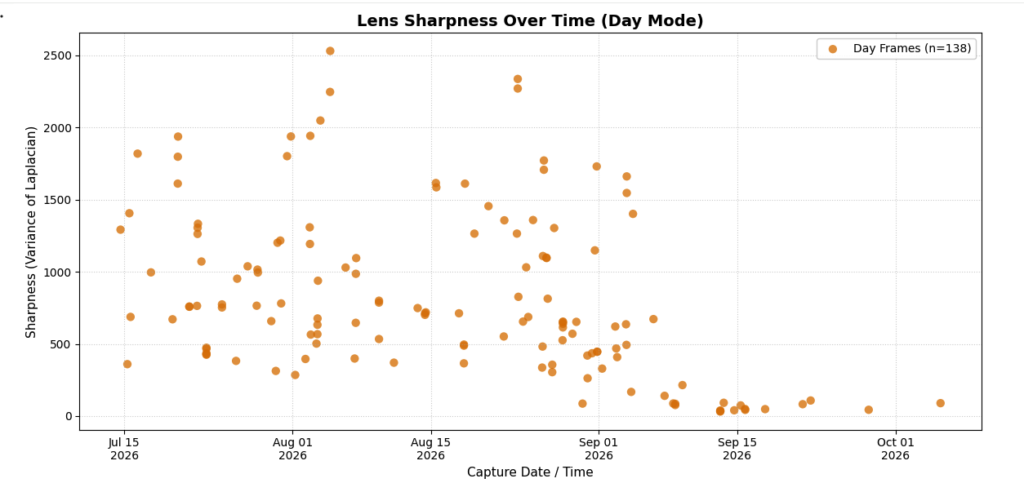
We can compare the data above with the data from the two prairie cameras, shown below. Note that the sharpness metric in each starts off in a range similar to that of the river set, but at some point in the deployment (about 1 month for the first camera, and about 2 months for the second camera) the sharpness metric drops to a very low value from which it never returns.
Desert Southwest Camera (from the Archive)
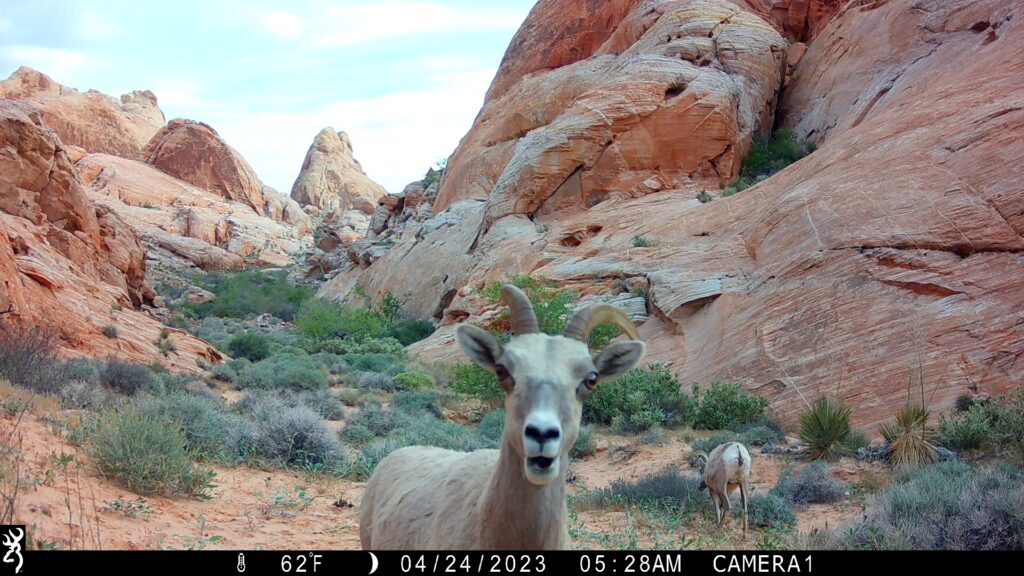
Out of curiosity, I applied this same video analysis tool to some archival video from a camera placed for a year in the US desert southwest. Here is a sample photo from that set.
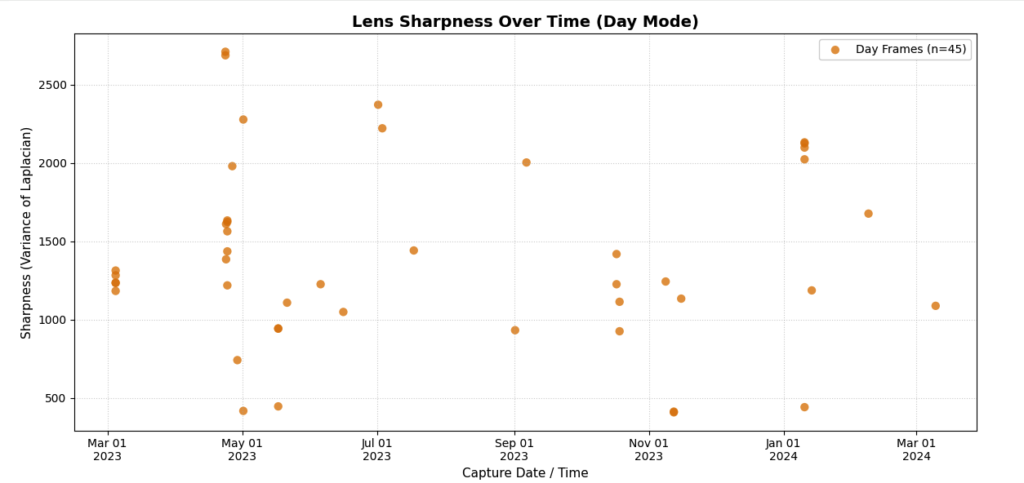
And here are the calculated sharpness metric values over time. There are fewer images in this data set because we only kept the ones with animals, but the sharpness metric remains in the range of 1000’s of units over the entire year long deployment.
Analysis
To me, this data suggests permanent damage to the lens cover or lens due to UV damage caused by partial exposure to direct sunlight. The “river bottom” camera does not fail because it is in a relatively shaded area. The desert southwest camera does not fail because it is in a relatively deep sandstone canyon, which blocks direct sunlight. The two prairie cameras are out in the open, and face into to sun for at least part of a typical summer day.
The signature of the two failing cameras is very similar — time passes in which the image quality remains essentially unchanged. But then, over the course of a single day a month or two into the deployment, the image quality drops precipitously, never to regain its original sharpness. This suggests cumulative, invisible damage, which eventually causes an acute failure. Thus, cameras not facing directly into the sun, but exposed to bright reflected UV light may sustain similar damage and fail over longer time periods.
The sample size of this analysis is small — juts two cameras. However, the fact that two cameras, in similar environments, failed in the same way, over very similar time periods suggests this is a widespread issue with this model trail camera.
For Trail Camera Vendors
We offer this post as data showing a major failure mode in some trail cameras, including Browning’s image-quality flagship HP5 ReconForce and Spec Ops trail cameras. We hope it inspires further investigation into the problem with manufacturing partners to find a lens cover material which is more robust to UV damage. It seems almost certain this will make good business sense, given the potential warranty service cost, and repetitional damage to the brand caused by in-field failure of these cameras.
Mitigation
We generally work very hard not to point our cameras into the sun. Mostly because is gives a poor image. Damage to the trail camera optics is apparently another good reason.
Based on this data, we can strongly recommend avoiding facing cameras into direct sunlight, especially in open environments where there are no shadows to interrupt the exposure.
Unfortunately, we do not have enough data to know whether these types of failures can occur in open-set cameras that to not directly face the sun.
Warranty Service
If your camera has already failed with “blurry image” syndrome, returning it for warranty service is the first response. It’s possible (especially if they’ve read this post) that your vendor will discourage you from putting the camera facing the sun, possibly by limiting the number of warranty returns.
This is a particularly frustrating failure mode, as it is not immediately visible when reviewing video on the small playback screen in the field. Having not recognized this failure in the field, we likely won’t be back to these cameras until next summer — essentially losing a whole winter season to blurry images.
Repair
If the camera is out of warranty, or if you want to use keep putting it facing the sun, you can repair the lens cover yourself, as I describe in this in the video below. Note that such a repair may fix your camera, but it will also void the camera warranty.
Comments?
Have you had a camera go blurry on you, especially one in an open, sunny environment? Or have you seen any similar failures in cameras kept in the shade. Let us know in the comments below.
Comments
Deep Tech: Analyzing Trail Camera Blurriness — No Comments
HTML tags allowed in your comment: <a href="" title=""> <abbr title=""> <acronym title=""> <b> <blockquote cite=""> <cite> <code> <del datetime=""> <em> <i> <q cite=""> <s> <strike> <strong>