Video Camera Trap with a Canon R50V Mirrorless Camera
We find ourselves operating our trail cameras exclusively in video mode these days. This allows us to better capture animal behavior, gives us more options for choosing the right still image, and is enabled by larger SD cards and power-efficient trail cameras. Yet up util now, we operated our “DSLR” sets only in photo mode. In this post, we change that. I will describe a simple set we used for testing the Canon R50V mirrorless camera, give some comparison video, and share configuration information for the Cogniys Scout Controller and the Canon R50V.
This is the second post on using the R50V for camera trapping — the first one focuses on the camera features itself. See:Canon R50V for Video Camera Trapping
Choosing a Camera
We chose the Canon R50V mirrorless camera for this project. I wrote a more detailed review of this camera in the context of camera trapping, which you can find here Canon R50V for Video Camera Trapping. To summarize, here area the key thing I looked for:
- Optimized for Video: There’s no eyepiece, and there are a number of automatic modes for shooting video, as well as an AI-enabled tracking autofocus.
- Price: The body for this camera lists at $650; with the competent 18-22 mm (fairly wide angle) zoom “kit lens”, the camera is available from multiple vendors for well under $800 USD. Importantly, this price covers the key features we’re interested in: an ability to take 4K, 60 FPS video when operated remotely and mounted in a weatherproof enclosure. It does not include expensive add-ons, such as a high resolution eyepiece, or water protection (on camera or lens)
- Remote Shutter Release: TheR50V features a standard 2.5 mm audio connector for a remote shutter release. Although this feature is poorly documented in the manual, it can be used to start a video from standby mode; and then stop the video when complete. It can be used with the Cognisys Scout Controller as well as home-brew triggers.
- Multi-channel Audio Support; the R50V features a standard 3.5 mm audio connector which can be used to connect to two external microphones. It also has stereo microphones mounted on the camera itself, but these are not that useful to us since the sound will be muffled inside the camera’s waterproof enclosure.
- Low Standby Power: The R50V automatically goes into a low power standby mode when left on, but idle. In this mode, it consumes xx uW of pewer, allowing for long battery life in typical trail camera deployments.
- Trigger Speed: I measured the time from the external trigger to the first video frame at 1.1 – 1.3 seconds. This would be terrible for a trail camera, which typically come in at well less than a half a second, but is pretty good in the context of DLSR and mirrorless cameras, which I’ve measured at 1.5 – 3 seconds.
The Set
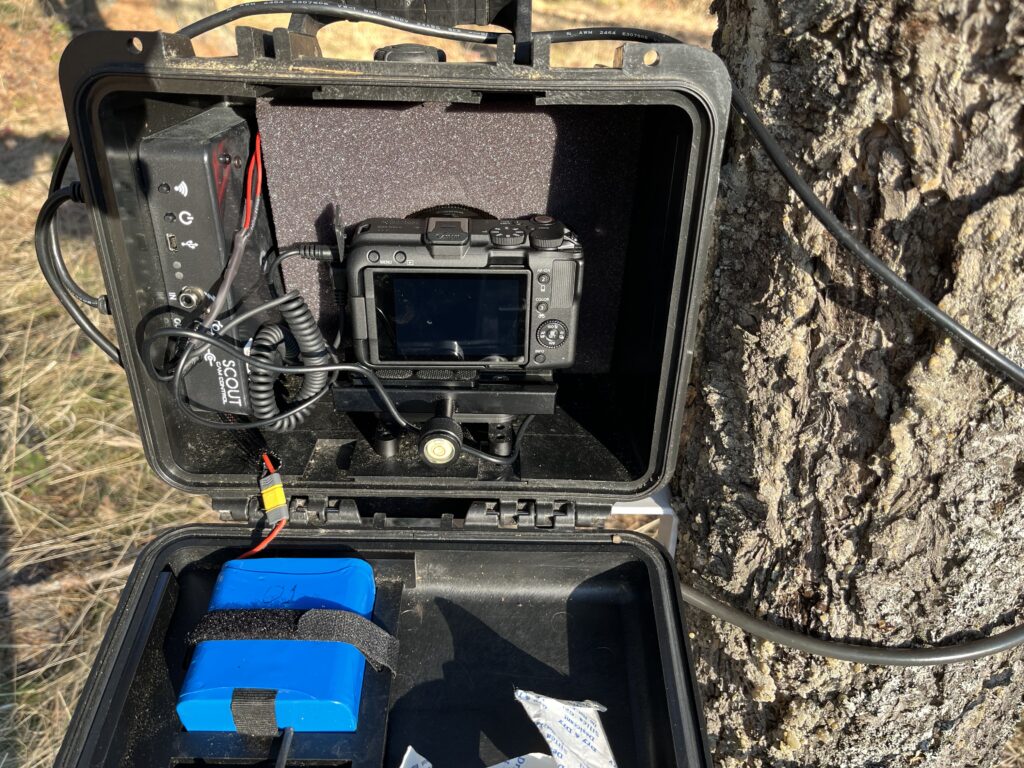
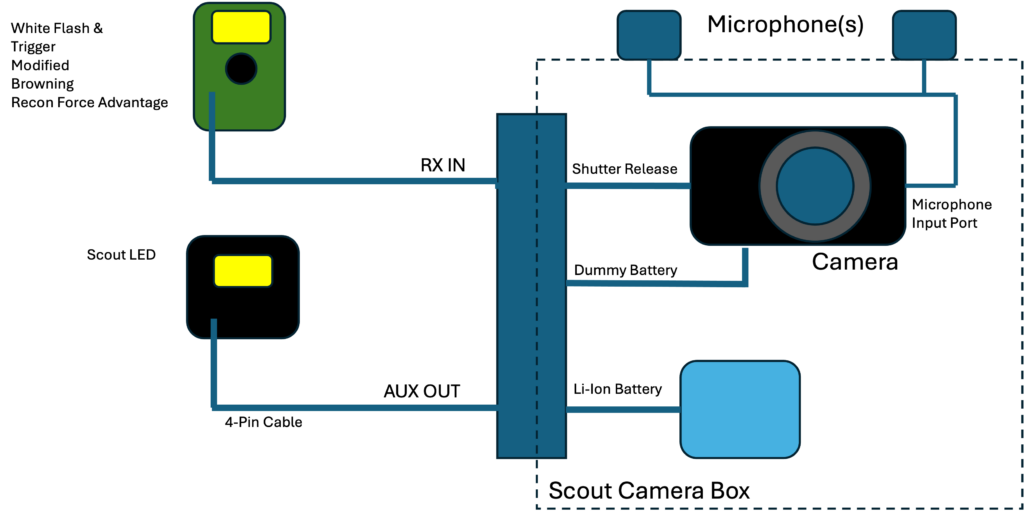
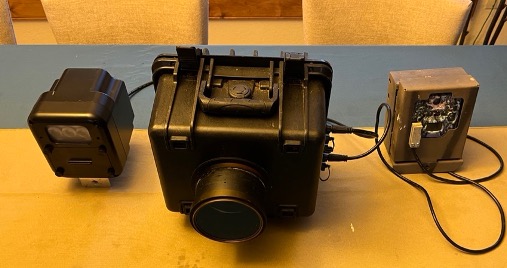
Here is a diagram of the set. It includes a Canon R50V camera mounted in a Cognisys Scout Cameara Box, shown in the middle. On the left is a modified Browning ReconForce Advantage trail camera which acts as a light and trigger for the system. On the right is a Cognisys SCOUT camera controller. The ReconForce Advantage has also been converted to white flash, which contributes to night time illumination. In addition, we use a Cognisys Scout LED for night time video.
Lighting & Trigger
Since we’ll be operating the camera in video mode, we need a continuous source of light, rather than the xenon flashes we typically use for our DSLR sets. For this set, I get the light from two sources. The first is a Browning ReconForce Advantage which is converted to white flash (Converting from IR to white Flash), and which acts as the trigger for the Cognysis Scout system (Using Trail Camera to Trigger a DSLR Camera). The Browning camera also takes video, giving us a good baseline to compare to the R50V.
For the second source of light, I use the Cognisys Scout LED. This unit can be triggered from the Scout controller and configured and tested via a smart phone app. It’s rugged, and reliable, if a little on the pricey side. When used with a Cognysis Trigger detector, the Scout LED can be triggered wirelessly. However, when used with an external trigger source, as in this set, the SCOUT LED requires a cable from the Scout Controller to the SCOUT LED.
It’s certainly possible to stay within the Cognysis catalog, and use one of their trigger detectors (there several options), as well as a second LED illuminator, if needed. An advantage of doing so is that all the pieces can be connected wirelessly and monitored with the Cognisys smart phone application.
In any case, we highly recommend placing a standard trail camera with the mirrorless set. In our case, the trigger camera serves this purpose. Footage from these cameras can help debug (the myriad) issues which seem to arise with home-grown sets.
Audio
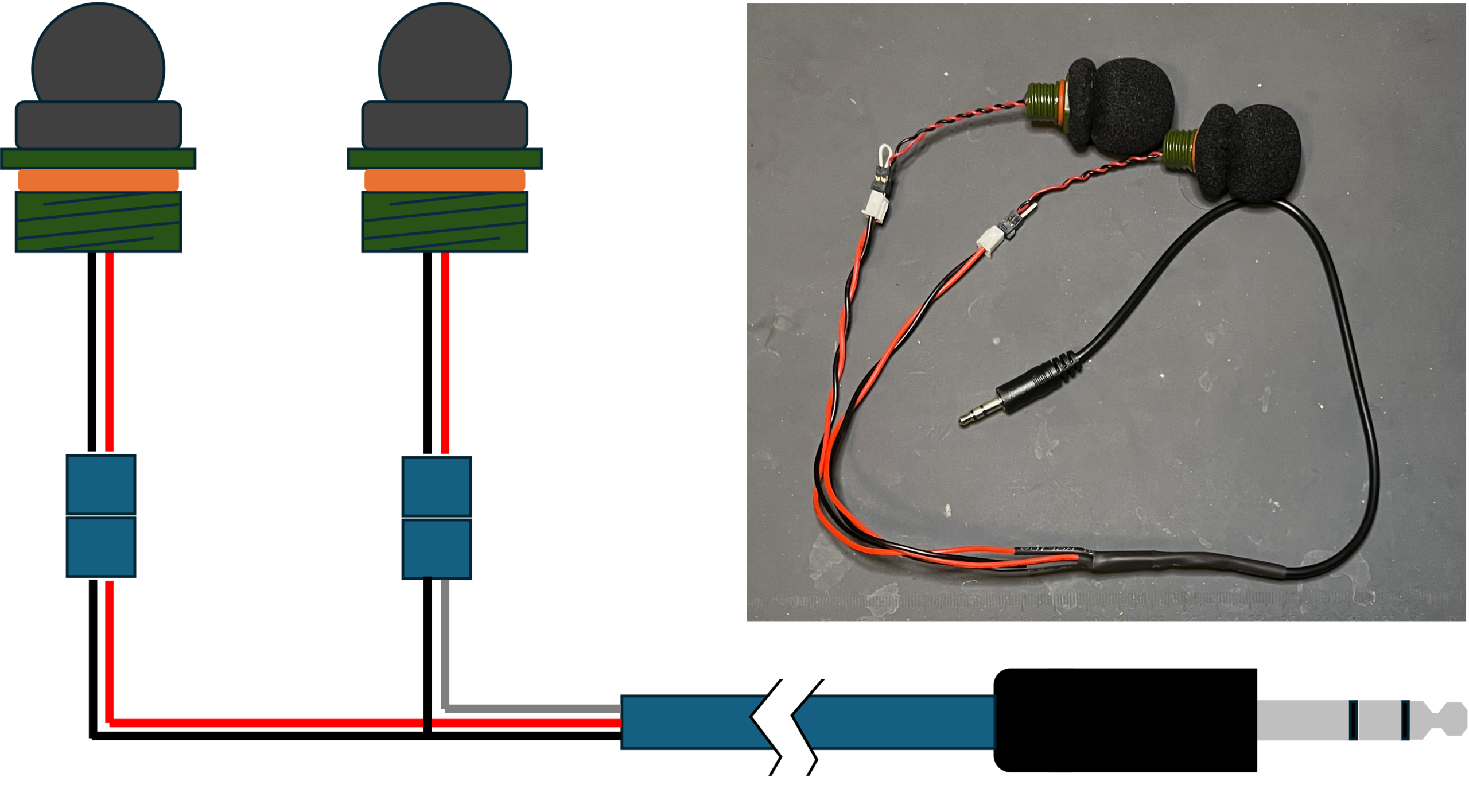
The R50V has a 3.5 mm jack for stereo microphone inputs. I purchased a pair of ruggedized, waterproof microphones from Wildlife Acoustics. These are provided as an option for their professional acoustic logger functions, and include both panel mounting hardware, and a foam wind filter.
Each microphone has a JST-1.25 connector that doesn’t fit directly into the R50V microphone port. Instead, I build a simple “Y” connector which connects both microphones to the connector for the camera. A schematic for this small piece of DIY and a photo of the finished product included below.
The audio from the R50V is excellent, so it’s well worth the effort of connecting the camera to a high quality pair of waterproof microphones.
Configuration Settings
Canon R50V Camera
Here are the settings I used for the R50V. There are about a zillion more, but we’ll keep things simple for now. They include “full automatic” mode with tracking AI autofocus. I chose to operate the R50V at 30 FPS, rather than 60 FPS, in order to get the maximum field of view by avoiding a “cropped sensor”.
| Primary Menu | Secondary Menu | Setting |
| Mode Dial | Video: A+ | |
| Tabs Menu: Movie Recording | <A+> | |
| Movie rec size | 4K 29.97P LGOP (30 FPS) | |
| Movie rec format | XF-AVC S YCCC420 8-bit (H264) | |
| Sound rec settings | On, AAA/16bit/2CH, External Microphone, Auto, Wind Filter Off, Audio noise reduction: disable | |
| Exposure | Detecte priority AE while AF On (per A+ mode) | |
| Color Mode | A (per A+ mode) | |
| IS (Image Stabilization) mode | On (per A+ mode) | |
| Auto Level | Disable | |
| AF Operation/Area | Move Servo AF | Enable (per A+ mode) |
| AF Area | Full Screen (per A+ mode) | |
| Focus Mode | AF (per A+ mode) | |
| Subject to detect | Auto (per A+ mode) | |
| Eye Detection | Auto (per A+ mode) | |
| Register People Priority | Off | |
| MF Peaking | Default (per A+ mode) | |
| Network Function | Advanced Connection | Connect to smartphone (tablet) |
| Airplane Mode | On when using Wi-Fi/BlueTooth app; otherwise OFF when leaving camera | |
| Wi-Fi Settings | Enable | |
| Bluetooth Settings | Enable | |
| Customize display/various settings | Power saving | Screen Dimmer: 10 sec Screen Off: Disable Auto power off: 15 sec |
| Tally Lamp | Off | |
| Auto-rotate | Off |
Turning off the Talley Lamp prevents a red LED on the front of the camera from coming on while taking video. We found that light from this LED reflected back off the Cognisys lens cover, producing an unwanted “red blur” artifact in the video.
Similarly, “Auto Rotate”, which electronically rotates the video image even as the camera moves, should be disabled. Otherwise, the the first couple of seconds of video includes a “rocking back and forth” of the image as the auto rotate algorithm converges.
Cognisys Scout Camera Controller and LED
The Scout Controller has a very general configuration screen which allows for the use of different cameras, in different modes. For use with the the Canon R50V, we want a configuration which initiates a video on an external trigger by enabling the shutter release for 0.5 seconds; then waiting 30 seconds white the camera takes a video; then ending the video by enabling the shutter release again. We also want to enable the Scout LED during this time. Tables for various Cognisys settings shown below. These are entered through Cognyssi SCOUT smart-phone app. .
| Field | Setting | Notes |
| Input | Any | Use any trigger source |
| # pics | 2 | First “picture” wakes camera up and starts video; second stops the video |
| Delay | 0 | |
| On Time 1 | 2.00 sec | This is enough time to wake up the R50V and start the video |
| Off Time 1 | 30.00 sec | This is the length of the video |
| On Time 2+ | 0.25 sec | A short pulse to stop the video |
| HP Limi | 0.0 sec | |
| Final Off | Off | |
| Extend On | Off |
| Field | Setting | Notes |
| Input | Any | Use any trigger source |
| # Pics | 1 | Single “picture” to turn LED on |
| On Time 1 | 30.00 sec | Video duration |
| Off Time 1 | 0.25 sec | Small trigger delay to next capture |
| On Time 2+ | 0.50 sec | Default (not used) |
| Off Time 2+ | 0.50 sec | Default (not used) |
| Final Off | Off | |
| Extend On | Off | |
| Extend Off | Off |
| Field | Setting | Notes |
| Input | Any | Use any trigger source |
| Delay | 0.00 sec | Don’t wait! |
| On Time | 30.00 sec | Duration of video |
| Off Time | 0.25 sec | Small trigger delay to next capture |
| Ramp Up | 0.10 sec | Turn light on gradually over 0.1 seconds |
| Ramp Down | 1.00 sec | Turn light off gradually over 1.0 seconds |
| Extend On | Off | |
| Extend Off | Off |
Early Results
We’ve only had this system out for 2026 summer season, but it has still gotten some interesting footage. The Browning Advantage we use as a trigger also takes a 30 second video. In the companion video to this post, below I offer video from the same scene taken by the Canon R50V, and by the Browning ReconForce Advantage, in both daylight and night time conditions.
Here are some early findings
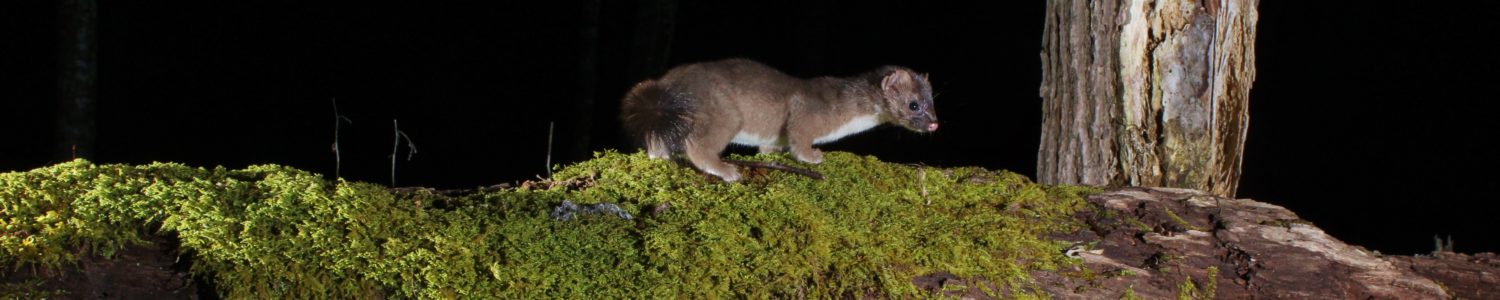
- The more expensive, more complex mirrorless set offers the best improvement over standard trail cameras for night time color video. This assumes that one is targeting species, like mountain lions, skunks, and badgers which are less senstive to visible flashes. In these cases, the placement of separate lighting eliminated eyesyine, and the color rendition and clarity of the R50V are far superior to typical white flash trail camera.
- For well-lit daylight sequences, there is less difference in image quality between the video produced by the R50V vs. a standard trail camera. Both offer good color match. The 4K resolution from the R50V is beautiful, but only applicable on a display device with the same or greater resolution, The 4K resolution of the R50V allows for higher magnification in post processing.
- The clarity of the audio from the R50V with a pair of external Wildlife Acoustics microphones is amazing and makes the case for improving the audio in standard trail cameras.
- The R50V consumes a lot of power when taking 4K video. We found that we only got about 100 minutes (200 30-second clips) of 4K video from a single Cognissys Li-Ion battery pack. Cognysis sells a “Y-expander” which allows you to connect two Li-Ion batteries together in parallel, which roughly doubles the amount of footage one can get from this set. We recommend this. You certainly want to avoid these types of sets in false-trigger prone areas.
- It may take some tuning of the cognsys Scout LED intensity to match the battery life of the camera. Unfortunately, the Cognsys system we use does not include a light sensor, so always engages the flash — even for daylight captures.
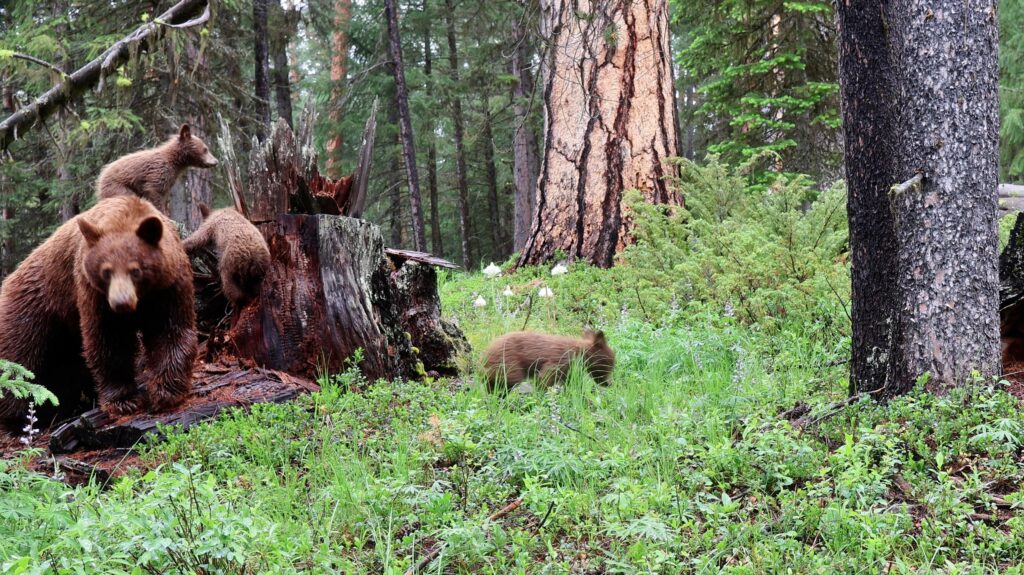
- Relative to a typical DSLR for taking stills, using the R50V to take video makes the setup much easier. This is primarily because it’s possible to use the auto-exposure and autofocus mechanisms on the R50V. These work very well. with the tracking focus on, as in the video above, the R50V easily following the antics of 3 black bear cubs, even as their mother walks right up to the camera for a smelfy. The Canon companion smart phone app makes final adjustment of the lens, and aiming of the camera a breeze.
Summary
So far we’ve been very happy with this set. It’s taken us a couple of tries to get all the settings right, but the footage so far has been worth the iteration. We’ve found this camera very good video in daylight — conditions under which our Browning ReconForce and SpecOps cameras also do well. Where this setup really “shines” is at night. With a more light sensitive sensor, and offset external lighting, the color and detail are much better in night time video than in our white-flash modified Browning Advantage, or Reconyx WP9 White Flash trail camera.
For a longer discussion on mirrorless cameras for camera trapping, please check out our book, “Trail Cameras and Custom Camera Traps: Technology, Ethics & Strategies for Success“.
If you’ve used the R50V, or another mirrorless camera for video camera trapping, please let us know in the comments below.
Comments
Video Camera Trap with a Canon R50V Mirrorless Camera — No Comments
HTML tags allowed in your comment: <a href="" title=""> <abbr title=""> <acronym title=""> <b> <blockquote cite=""> <cite> <code> <del datetime=""> <em> <i> <q cite=""> <s> <strike> <strong>