
Browning SpecOps Edge PIR Failure
This is a short post about a recent failure I fixed in a Browning SpecOps Edge (BTTC-8E) trail camera. This somewhat older model has a “smart” PIR sensor which failed in a very strange way. In addition to correctly triggering, it falsely triggered at regular two hour intervals.
I have added this strange case to my “How (some) Trail Camera Fail” post, which includes other strange, and less strange trail camera failure modes and fixes.
Symptoms
We had used this camera successfully for several years without issue. However, after one 6 month deployment, we went to check it in the field and found that it had taken about 500 30 seconds videos, mostly false triggers, and the batteries were dead. Our records showed that we had put in new batteries, but we weren’t 100% sure. The camera seemed to work fine after we installed a new set of batteries, and it passed all the the diagnostics in Hidden Test Mode in Browning Trail Cameras. It also seemed to work in the “Motion Test” mode.
We decided to leave it out again, hoping perhaps that the combination of winter and perhaps faulty batteries caused it to fail. Unfortunately, when we returned some time later, we saw a very similar behavior. The batteries were dead, and there were about 500 captures, mostly false triggers. We stuffed the camera into our backpack and took it home for further diagnosis.
Debug
Just by reviewing the video captures, one after another, it was clear that the camera was triggering both day and night, and although some of the 500 odd-videos had animals or blowing vegetation, most seemed to be of empty, quiet scenes.
As in the field, the camera passed the Hidden Diagnostic Tests. In addition, the “Motion Test” function of the PIR sensor seemed to work fine.
A Periodic Problem
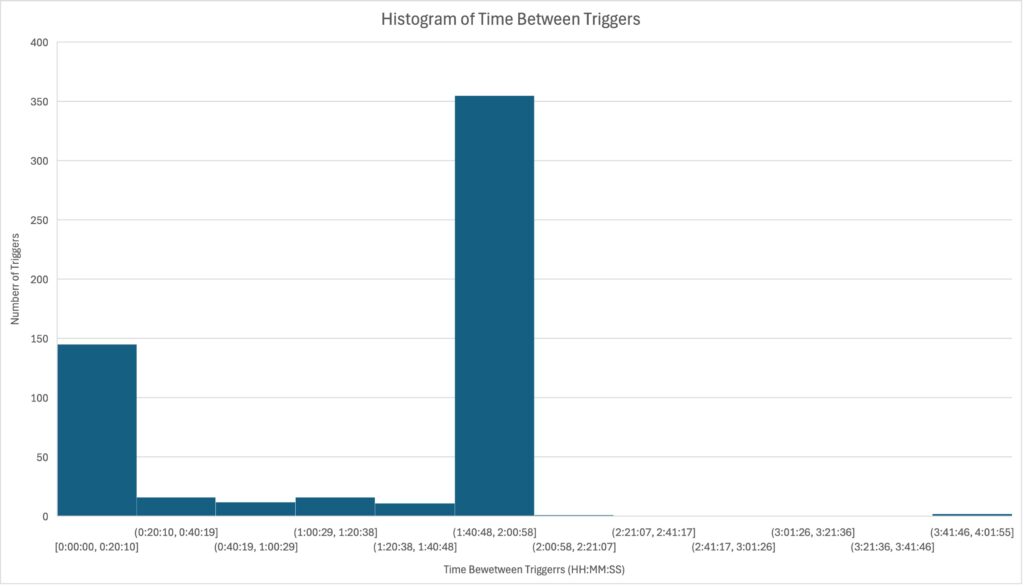
I made a listing of all the files on the SD card, along with their creation dates. Then I put these into a spreadsheet and calculated the “time between captures”. I plotted this data as a histogram, shown below. Lo — more than 2/3 of the captures had been taken at roughly on 2-hour intervals.
I then made another plot using the same data, showing the time between captures as a function of time, plot below,.
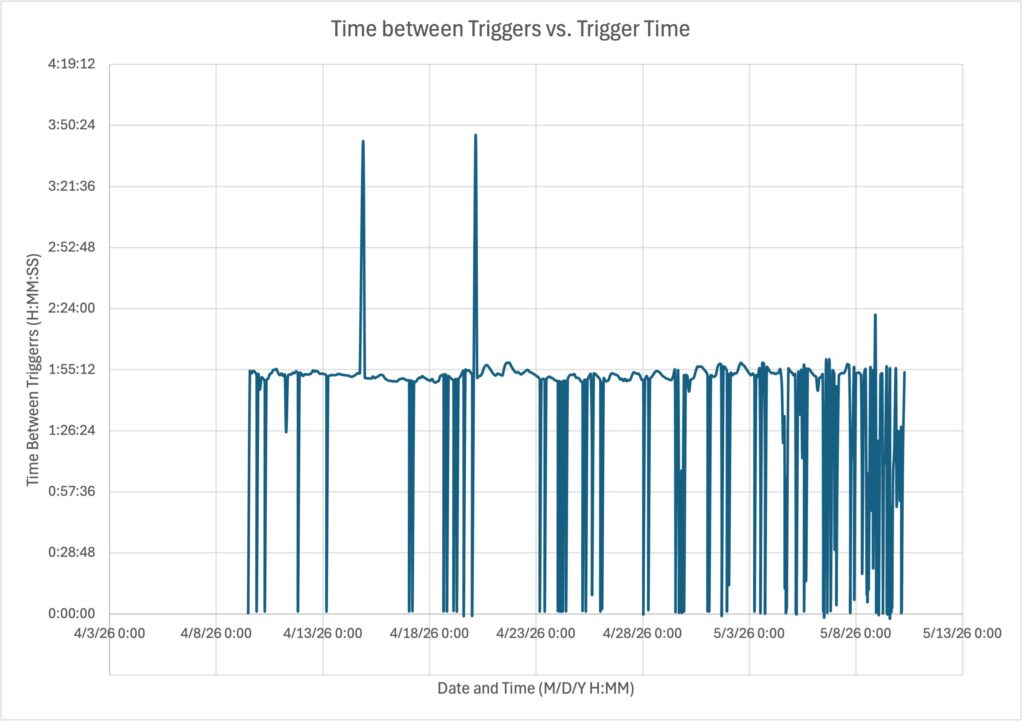
This data was quite illuminating. A couple of things struck me:
- Almost none of the captures were separated by more than about 2-hours
- Most of the captures we separated by 2-hours, but not exactly two hours. The predominant inter-arrival times were between 1 hour and 50 minutes and 1 hour and 58 minutes.
All this showed that the bug, whatever it was, could keep time. This ruled out a whole bunch of causes, including those relating to temperature or mechanical vibration.
Replicating the Failure
I put a piece of tape over the PIR sensor, set the camera to “video” mode and left it for a day. With the PIR sensor covered, there should have been no triggers, and no captured video. Instead, I got a picture of the lab about every two hours. This was a big step.
Corrupted Firmware?
The firmware in these cameras uses a real-time-clock to schedule periodic tasks in the camera. For example, in Timelapse mode, the clock is used to wake the camera up periodically to photos at regular intervals. That was something like what I was seeing, though not exactly. I had the camera set to “video” mode, for example. There are no settings in the timelapse mode for 1 hour and 56 minutes. Finally, the real-time-clock is quite accurate, and if it were being used, there would not be a ~5 minute variation in the trigger separation.
None-the-less, I re-installed the firmware, just in case some sort of strange software gremlin had snuck into the firmware. This did not fix the problem.
PIR Sensor?
My next thought was the PIR sensor itself. I happened to know that this earlier model used “smart PIR sensor” — that is, a sensor compatible with the Excelitas PYD1598 “Digi Pyro” detector. This device integrates the two pyro-electric sensor elements used to detect heat, as well as the amplifier, and a digital logic necessary to set and report the trigger parameters.
Altough the details of the digital logic implementation are not documented, there is a line in the PYD1598 specification which refers to a nominally 32 kHz internal clock. This is likely used to clock an ultra low power microcontroller which implements the the “smart” functions in the sensor.
The important thing is that it provides a source of periodicity.
New Hypothesis: Periodically Triggering PIR Sensor
My new hypothesis was that the PIR sensor itself was periodically triggering the camera and firmware.
I initally put the camera into “Motion Test” mode, covered the PIR lens with tape, and waited to see if the LED came on every two hours. It did not. But the “Aim Test” mode is different than the normal operatng mode for the PIR sensor, so I tried something different.
I put a scope lead on the output of the PIR sensor that wakes the camera up. With the PIR sensor covered with tape, this should never trigger. I set the scope for “Single” shot trigger, and with the camera on, went away for a few hours.
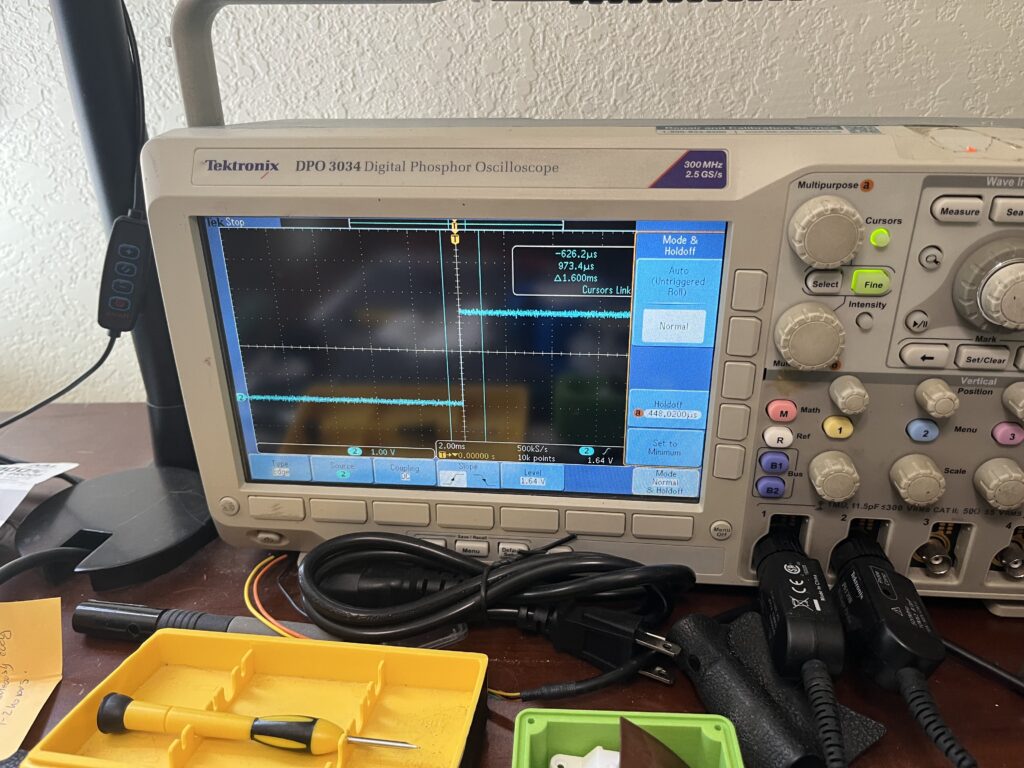
Sure enough, when I returned, the scope had triggered, recording the low-to-high transition from the PIR sensor that would wake up the camera and cause it to take a video.
What’s Going On?: AI Speculation
Failure of such a packaged part seemed to me very strange, so I did what I often do these days, which is to ask Google’s AI agent, Gemini about PYD1598 failure modes.
After some back and forth, we couldn’t find any cases of this failure mode on the web. But that didn’t stop Gemini from spinning a tale about the internal processor in the PIR sensor (driven by the 32 kHz clock) executing a book keeping function every 2^28 cycles (roughly 2 hours), and encountering an error, causing it to trigger.
When pressed, Gemini admitted that this was all speculation based on the single reference to a 32 KHz clock in the specificition. But this is pretty reasonable speculation. The 32 KHz clock in the PIR sensor has a wide operating range, and probably does not have any temperature compensation. This would explain the variation I see in the time between triggers. It does make sense that the smart PIR sensor might do it’s own recalibration operations every couple of hours. I don’t have a better explanation.
Fix
After all this debugging, the fix was straightworad. I unsoldered and removed the old PIR sensor from the camera. I then replaced with an Excelitas PYD1598 smart sensor I had ordered for another project.
I put the camera back together, and turned it on. It passed all the hidden diagnostic tests, including those for the PIR sensor, a good first step. Then I put it in video mode, with tape over the PIR sensor, and left it for a day. No periodic triggers.
I also confirmed that ti correctly triggered for actual heat movement.
Excelitas Knockoff?
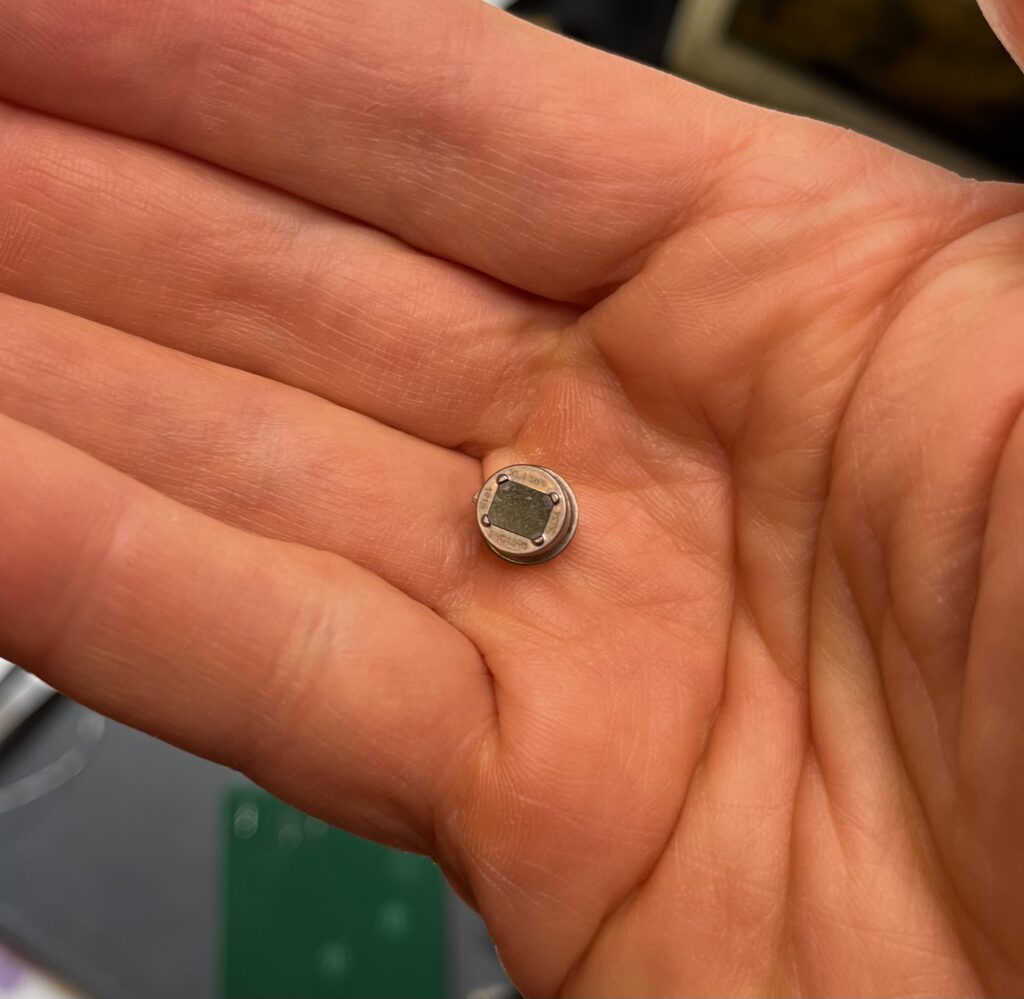
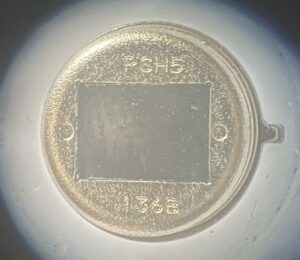
The earlier Advantage version of this camera line used Excelitas PYD1598 digital sensors. But I found that the part I removed from my Edge did not have Excelitas markings. Instead, it is marked “PSH5 136B”. Google returns no hits on this, but it may not be Excelitas part, which could help explain the strange failure.
Conclusion
This periodic false triggering of a trail camera because of a failure of the PIR sensor is a new one for me. Posting to be useful to the next searcher for “PIR sensor failure modes” on the web.
Comments
Browning SpecOps Edge PIR Failure — No Comments
HTML tags allowed in your comment: <a href="" title=""> <abbr title=""> <acronym title=""> <b> <blockquote cite=""> <cite> <code> <del datetime=""> <em> <i> <q cite=""> <s> <strike> <strong>